5 Best Alarm System for Apartment (October 2026)
The best apartment alarm systems include the SimpliSafe 8-Piece Wireless System for several accessible windows, the Ring Alarm 5-Piece Kit for growing a setup, and the eufy 5-Piece Home Alarm Kit for simple self-monitoring.
On this page (9 sections)
- Which apartment alarm systems made the cut?
- Best alarm systems for apartments
- How do you choose an alarm system for apartment living?
- Should you self-monitor or choose professional monitoring?
- How should you set up an apartment alarm?
- What happens if apartment power or Wi-Fi fails?
- How do you keep an apartment alarm ready?
- Which apartment alarm buying mistakes should you avoid?
- Which apartment alarm system should you choose?
The SimpliSafe 8-Piece Wireless System is our best alarm system for apartment living when you need several openings covered and want optional professional monitoring. Ring suits a smaller setup you plan to expand, while eufy suits people who want app alerts without monthly fees.
Start with your floor plan and response plan. A useful kit covers the doors and windows that matter, fits your lease and sends alerts to someone who can act.
For a wider look at rental-friendly choices, see our home alarm systems for renters guide. Our door and window alarm sensor guide helps you plan coverage for individual openings.
Our picks at a glance
-
1
 Best for several accessible windows
SimpliSafe 8-Piece Wireless System
8.9/10 our score
See it on Amazon -
2

-
3

- 4
 Check it
SimpliSafe 5-Piece Wireless System
Best for single-door apartments - 5
 Check it
eufy 7-Piece Essential Alarm System
Best for larger self-monitored apartments
Which apartment alarm systems made the cut?
These picks cover small starter setups, several-entry layouts and self-monitoring without monthly fees. We compared included sensors, installation methods and service requirements against those apartment needs.
Total piece count can mislead you. A base station, keypad and range extender each count as a component, but none adds another door or window to your entry coverage.
We gave more weight to useful coverage and clear service choices than to extras that may sit unused. No kit here includes a camera, so treat video as a separate decision.
| Product | Best for | Entry sensors | Setup | Monitoring | Our score |
|---|---|---|---|---|---|
| SimpliSafe 8-Piece Wireless System | several accessible windows | 4 | No wiring or drilling | Optional professional monitoring | 8.9 |
| Ring Alarm 5-Piece Kit | growing a setup | 1 | Wireless DIY | Available with a compatible plan | 8.8 |
| eufy 5-Piece Home Alarm Kit | simple self-monitoring | 2 | Self-adhesive sensors; included mounts | App alerts with no monthly fees | 8.2 |
| SimpliSafe 5-Piece Wireless System | single-door apartments | 1 | No wiring or drilling | Optional professional monitoring | 8.1 |
| eufy 7-Piece Essential Alarm System | larger self-monitored apartments | 4 | In-app guidance; no complicated wiring | Free app control and alerts | 7.9 |
Best alarm systems for apartments
The SimpliSafe 8-Piece Wireless System leads for apartments with several entry points and a possible need for professional monitoring. Choose among the remaining kits by the openings you need covered and who will handle an alert.
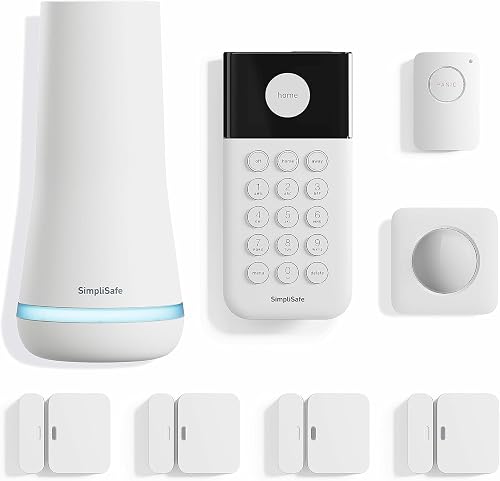
SimpliSafe 8-Piece Wireless System: Best for several accessible windows
- 4 entry sensors
- Motion sensor and panic button
- No wiring or drilling required
- Optional professional monitoring
Choose this bundle for several doors or accessible windows and the option of professional monitoring. The included panic button adds a way to call for help under the monitoring plan's terms.
Pros
- Covers several openings out of the box
- Includes keypad and panic button
- Optional monitoring without a long-term contract
Cons
- More equipment than a single-door setup needs
- Panic button dispatch requires professional monitoring
SimpliSafe's larger bundle suits a ground-floor apartment, a unit with a balcony entrance or any layout with several openings you want monitored. It includes 4 entry sensors, a motion sensor, Base Station, keypad and panic button.
Installation starts with plugging in the Base Station, downloading the SimpliSafe app and placing the sensors. No wiring or drilling is required, which helps when your lease limits permanent changes.
The entry sensors can also monitor cabinets, but cover exterior access points before assigning one to an interior space. Secret Alerts can quietly notify you about access to a private area without sounding an alarm.
Optional professional monitoring has no long-term contract. The panic button's police dispatch function requires that service, so include the monitoring decision when deciding whether that button matters to you.
Choose this kit for several-opening coverage with a monitoring option. Skip it if you only need one door monitored and have no use for the extra equipment.
For a smaller SimpliSafe package, compare the SimpliSafe 5-Piece Wireless System. SimpliSafe sells and supports its systems and monitoring services in the US, which matters if you're buying for an apartment elsewhere.
Ring Alarm 5-Piece Kit: Best for growing a setup
- 1 contact sensor
- Motion detector and range extender
- Ring app notifications
- Expandable with compatible accessories
Start with one monitored opening and add compatible sensors as your coverage needs grow. Check plan requirements if remote arming or backup connectivity matters to you.
Pros
- Expandable sensor coverage
- Includes keypad and range extender
- Mobile notifications through the Ring app
Cons
- Only one contact sensor included
- Remote arming requires a compatible Ring Protect plan
Ring's starter bundle fits an apartment where one entrance is the first priority and you expect to build out coverage later. It contains a Base Station, keypad, 1 contact sensor, motion detector and range extender.
The contact sensor belongs on the opening you most want monitored. The motion detector adds indoor detection, but it does not provide separate open-door alerts for other doors or windows.
Ring supports additional compatible sensors and accessories sold separately. Plan those additions before ordering if your apartment has several reachable windows, rather than assuming a 5-piece kit means five monitored openings.
The Ring app provides mobile notifications when the system is triggered. Remote arming, backup connectivity when Wi-Fi goes down and professional monitoring require a compatible Ring Protect plan.
Choose Ring if gradual expansion fits your plans, especially if you want to manage Ring devices through its app. Skip this starter bundle if you need several contact sensors immediately and don't want to arrange extra components.
Read our guide to Ring Alarm and subscription requirements before choosing. Voice arming and disarming with Alexa also require a Ring Protect subscription.
eufy 5-Piece Home Alarm Kit: Best for simple self-monitoring
- 2 entry sensors
- Motion sensor and keypad
- App alerts
- No monthly fees
A compact choice for people who want to receive alerts and handle the response themselves. Two entry sensors suit a limited coverage plan without a recurring service fee.
Pros
- No monthly fees
- Two openings covered in the starter bundle
- App alerts for detected motion or a breach
Cons
- Limited initial coverage for several accessible windows
- Mounting methods still need to fit your lease
The eufy 5-Piece Home Alarm Kit suits someone who wants a small self-monitored setup without a recurring fee. Its HomeBase, keypad, motion sensor and 2 entry sensors cover a limited entry plan.
For example, you could prioritize your front door and a balcony door. Choose the openings from your actual layout rather than placing both sensors wherever installation looks easiest.
The entry sensors use self-adhesive attachment, and mounts are included for the motion sensor and keypad. Check the surface instructions and your lease before attaching anything to painted trim.
The eufy Security app notifies you when motion or a breach is detected. That makes your phone settings and availability part of the setup, since you'll be deciding what action to take.
Choose this kit if you'll handle alerts yourself and its initial coverage matches your apartment. Skip it if you want a service to arrange emergency help, or if several accessible windows would exhaust the included sensors.
Our guide to home alarm systems without a subscription explains which functions to compare before choosing a fee-free system.
SimpliSafe 5-Piece Wireless System: Best for single-door apartments
- 1 entry sensor
- Motion sensor and keyfob
- No wiring or drilling required
- Optional professional monitoring
Choose the smaller SimpliSafe bundle when one opening is your main priority and you want a keyfob. It also offers optional professional monitoring without a long-term contract.
Pros
- Compact bundle for limited entry coverage
- Includes a keyfob and keypad
- Supports at-home arming with Alexa or Google Assistant
Cons
- Only one entry sensor included
- Professional monitoring requires a separate plan
The smaller SimpliSafe bundle suits an apartment where one opening is the clear priority. It includes a Base Station, keypad, 1 entry sensor, motion sensor and keyfob.
The keyfob gives you another control option alongside the keypad. Consider who will use each control and where they'll keep it, especially if roommates arrive and leave at different times.
Setup follows the SimpliSafe app and requires no wiring or drilling. At-home arming works with Alexa or Google Assistant, and professional monitoring is optional without a long-term contract.
Its main limit is coverage at the door or window level. A motion sensor can detect activity inside, but it doesn't turn an unmonitored balcony door into a separately monitored opening.
Choose this kit for a focused single-entry setup with SimpliSafe's monitoring option. Skip it when several exterior openings need attention from day one, since the larger bundle better matches that plan.
For help comparing components before buying, see how to choose a DIY home alarm system. Make that choice before mounting equipment so your final layout follows your needs.
eufy 7-Piece Essential Alarm System: Best for larger self-monitored apartments
- 4 entry sensors
- Motion sensor and keypad
- No monthly fee
- HomeBase Mini with 64GB local storage
This bundle suits a self-monitored apartment with several openings to cover. Check exact device compatibility before making its HomeBase Mini part of a camera or doorbell setup.
Pros
- Covers several entry points
- No monthly fee for app control and alerts
- Expandable with compatible eufy accessories
Cons
- Camera and doorbell support varies by model
- Extra sensors may go unused in a small studio
The eufy 7-Piece Essential Alarm System suits a self-monitored apartment with several doors or accessible windows. It includes 4 entry sensors, a motion sensor, keypad and HomeBase Mini with 64GB local storage.
Free app control and activity alerts make it an option for people who want to avoid monthly fees. In-app guidance walks you through setup without complicated wiring, and compatible sensors or accessories can be added later.
Storage capacity is not a reason to assume cameras are included. HomeBase Mini supports selected eufy cameras and video doorbells, with features and storage behavior varying by model.
Eufy says the entry and motion sensor batteries last up to 5 years. The USB-rechargeable keypad lasts about 6 months per charge, so it needs a different care routine from the sensors.
Choose this bundle for wider entry coverage without a recurring fee. Skip it if you'll leave alerts unattended, or if your main goal is joining existing cameras without first confirming exact compatibility.
Compared with eufy's smaller kit, its strongest reason to buy is the broader coverage included at the start. Match that benefit to your floor plan rather than choosing it for the higher piece count.
How do you choose an alarm system for apartment living?
Choose by entry coverage, mounting limits and alert response, in that order. A kit fits your apartment when you can place its sensors correctly and understand what happens after an alarm.
How many sensors does an apartment alarm need?
Count each exterior door and reachable window you want monitored. Include balcony access, even on an upper floor, and consider access from shared walkways or nearby structures.
A studio can need more entry sensors than a larger upper-floor unit. Room count describes living space; the number of accessible openings tells you more about entry coverage.
Make a short map before shopping. Mark each opening as essential, useful or low priority, then compare the essential total with the kit's included entry sensors.
For windows with several moving sections, check the sensor's placement instructions before deciding how many you need. One window frame does not always mean one monitored opening.
See our guide to choosing door and window alarm sensors for placement planning. Keep cabinet monitoring behind exterior access points on your priority list.
What does a motion sensor add?
A motion sensor adds coverage inside a room or passage after movement occurs within its detection area. An entry sensor instead reports that a particular door or window opened.
Use those roles together when planning a layout. A monitored entrance plus indoor motion detection serves a different purpose from monitoring two separate doors.
Pets also affect placement. SimpliSafe describes the 8-piece kit's motion sensor as suitable for pets under 60 lb, but placement instructions still matter, and that guidance should not be applied to every kit here.
Can apartment alarm sensors attach without damage?
Drill-free setup does not guarantee damage-free removal. Adhesive can lift paint or leave residue, while screws can leave holes that your lease requires you to repair.
Read both the attachment and removal instructions before choosing a location. Check rules for door frames, windows and shared-facing surfaces, then ask building management about any unclear restriction.
Also confirm that doors and windows still open, close and lock normally with the sensor in place. A sensor should not obstruct a latch or stop a window from closing fully.
For a clearer explanation of the components involved, read what comes in a home alarm system. It separates the jobs of the base station, keypad and sensors.
Should you self-monitor or choose professional monitoring?
Choose self-monitoring if you can manage alerts and response yourself. Consider professional monitoring if you want a service to receive alarm signals and arrange help under its terms.
Self-monitoring means planning for an alert while you're working, asleep or away from your phone. Discuss a response plan with other household members rather than assuming someone else will notice.
Professional monitoring also needs preparation. Confirm contact details, understand the service's verification process and check local alarm registration requirements before activating a dispatch service.
Ring and both SimpliSafe kits offer professional monitoring options. Both eufy kits here provide app alerts without monthly fees, so decide based on the response you need rather than the subscription label alone.
Our guide to home alarm system monthly fees explains what to compare. Review dispatch, remote control and backup functions separately, since one service term does not describe every feature.
Separate phone alerts from remote control
Receiving a notification and changing the system's armed state are different functions. A system can offer one under different terms from the other.
Ring is a useful example: its app sends trigger notifications, while remote arming requires a compatible plan. Decide whether you need to arm after leaving home or mainly want alerts once you've armed at the keypad.
Decide who will act on a notification
A no-monthly-fee alarm works best when someone has a clear response role. Know how you'll contact a roommate, building staff or emergency services without entering a situation that may be unsafe.
You don't need to confront anyone to make an alert useful. Our self-monitored alarm system guide explains how handling notifications yourself differs from professional monitoring.
How should you set up an apartment alarm?
Set up the system before permanently placing its components, then confirm that each sensor communicates from its intended location. This helps you catch placement problems before applying adhesive or using mounts.
Plan the base station and keypad locations
Choose a base station location that follows the manufacturer's guidance and has the required power connection. Keep it somewhere you can reach for maintenance rather than burying it behind furniture.
Place the keypad where household members can reach it during normal entry and exit. Everyone should understand how to arm and disarm before relying on the system.
A wireless sensor connection does not mean every component can sit anywhere. Confirm communication at each planned location, especially across a long apartment or through several interior walls.
Fit entry sensors before fastening them
Check alignment with the door or window fully closed and throughout its normal movement. Follow the sensor's required gap rather than estimating by eye.
Raised trim, uneven frames and sliding doors can make placement awkward. Resolve those fit issues before fastening either part, and don't alter a rental door or frame to force a fit.
Prepare the surface as directed and allow any required adhesive bonding time. Loose attachment can shift sensor alignment even when the electronics still have power.
Place motion sensors around household routines
Aim motion coverage at the area you want monitored, following the instructions for that exact sensor. Avoid guessing a mounting height from advice for a different model.
Think about pets, moving curtains and the routes people use at night. Use supported system settings to suit the household rather than assuming every detector should remain active whenever someone is home.
Confirm alerts and teach everyone the routine
Use the manufacturer's setup check to confirm that each named sensor matches the right opening and that notifications reach your phone. Clear names such as “balcony door” make an alert easier to understand.
Practice normal departures and arrivals with everyone who uses the apartment. Include guests, cleaners or pet sitters in your access plan instead of passing around controls without explanation.
If professional monitoring is active, follow its instructions for system checks. Avoid an unintended emergency dispatch while confirming that the equipment works.
What happens if apartment power or Wi-Fi fails?
Check power backup and communication backup separately, because they solve different problems. A powered base station still needs a supported way to send remote signals when your usual connection is unavailable.
For the SimpliSafe 8-piece kit, SimpliSafe describes up to 24 hours of Base Station battery backup and built-in network backup tied to professional monitoring. Ring's backup connectivity when Wi-Fi goes down requires a compatible plan.
Do not assume every kit here has those same protections. If outage communication is essential, confirm the exact kit and service terms before buying.
Think through an ordinary outage at home: your router may lose power along with the lights. The important question is which local functions and remote alerts remain available in that situation.
Our guide to home alarm systems with cellular backup explains the questions to ask when backup communication is a priority.
How do you keep an apartment alarm ready?
Keep sensors attached, respond to battery warnings and check the system after changes to your apartment. Long battery life does not replace routine care.
Check for loose mounts, shifted magnets and blocked motion sensors. Moving a bookcase, hanging a curtain or replacing a door can change a setup that previously worked.
Follow the manufacturer's cleaning instructions and keep sensor housings dry. Avoid painting over sensors or fastening decorations to them.
Maintain phone notifications as carefully as the hardware. Recheck alert permissions after changing phones, reinstalling an app or changing notification settings.
Review access when a roommate moves out or a temporary visitor no longer needs it. Update any codes or shared controls using the system's supported process.
Before moving, follow the removal directions and label components for the next apartment. Rebuild your coverage plan for the new layout rather than copying the old placement.
Which apartment alarm buying mistakes should you avoid?
Avoid counting components as coverage or assuming every connected feature is included. Those mistakes can leave important openings unmonitored or create service needs you hadn't planned for.
- Buying by apartment size alone: count accessible openings, then consider room coverage.
- Treating motion detection as a sensor on every window: motion detects activity within its coverage area after someone enters that space.
- Confusing an alert with emergency dispatch: app notifications and professional monitoring serve different roles.
- Assuming wireless means no power connection: read the setup requirements for the base station as well as the sensors.
- Buying around a storage number: confirm camera inclusion and exact compatibility before planning video coverage.
- Mounting before checking fit: confirm alignment, communication and lease rules first.
Also avoid making voice control the deciding feature. The household needs a clear everyday routine at the keypad or other supported control, including when a phone or voice assistant is unavailable.
Which apartment alarm system should you choose?
Choose your alarm system for apartment living by the openings you must cover and the response you want. Write those two needs down before deciding between bundles.
Pick the SimpliSafe 8-Piece Wireless System for several monitored openings and optional professional monitoring. Choose its 5-piece sibling when one entry sensor meets your initial plan and you want the included keyfob.
Pick Ring for an expandable starter setup after checking its plan requirements. Choose the eufy 5-piece kit for a small self-monitored layout, or the eufy 7-piece kit when you need broader entry coverage without monthly fees.
Before ordering, confirm mounting fit, service terms and any device compatibility you need. For more options built around rental constraints, continue to our alarm systems for renters guide.
Our top 3 picks at a glance
-
1
Best for several accessible windows
SimpliSafe 8-Piece Wireless System
8.9/10 our score
See it on Amazon -
2
-
3
Frequently asked questions
Can you install an alarm system in an apartment without drilling?
Yes, both SimpliSafe kits here support installation without wiring or drilling, and the eufy 5-piece kit uses self-adhesive entry sensors. Check the mounting instructions for every component before attaching it.
Your lease may restrict adhesives as well as screws, and drill-free installation does not guarantee damage-free removal.
How many entry sensors does an apartment alarm need?
Plan one entry sensor for each door or window you want monitored, subject to the sensor's installation requirements. Start with your apartment entrance, then consider reachable windows, balcony doors and other access points.
A motion detector adds indoor coverage, but it does not identify an opened window before someone enters.
Can an apartment alarm work without professional monitoring?
Yes, both eufy kits here provide app alerts without monthly fees, allowing you to handle the response yourself. Features available without a plan differ across systems.
Before choosing, separate local alarm functions, phone notifications, remote arming and backup connectivity so you know which parts depend on a subscription.
Should renters choose a security system with cameras?
Choose cameras when seeing activity would help you decide what happened and how to respond. Entry sensors detect opened doors or windows, so they serve a different purpose.
None of these bundles includes a camera.
Check device compatibility, indoor privacy needs and building rules before adding video coverage.