5 Best Home Security Systems With Cellular Backup (October 2026)
The best home security systems with cellular backup include the Ring Alarm 8-Piece Kit (2nd Gen) for smaller homes, the SimpliSafe 8-Piece Wireless System for monitored households, and the Ring Alarm Pro 8-Piece Kit for replacing your router.
On this page (8 sections)
- How we chose home security systems with cellular backup
- Which home security system with cellular backup fits your home?
- What should backup keep working during an outage?
- How many sensors and keypads does your home need?
- How should you set up an alarm for outage readiness?
- What care keeps backup useful after installation?
- Which buying mistakes leave gaps in protection?
- Which system should you choose?
The Ring Alarm 8-Piece Kit (2nd Gen) is our top starting point for a smaller home shopping for a home security system with cellular backup. Before buying, confirm cellular service: Ring describes Wi-Fi outage support with a compatible plan, while SimpliSafe describes monitored network backup without identifying the connection type.
Your choice needs to cover 2 separate failures: loss of internet and loss of electricity. A backup connection carries messages; a battery keeps equipment running.
Start with the doors and windows you need covered, then match the required service to your outage concerns. Our DIY home security system guide helps you compare the wider kit choices.
Our picks at a glance
-
1

-
2
-
3

- 4
 Best for multiple entrancesCheck it
 - 5
 Check it
Ring Power Pack Backup Battery
Best for longer power outages
How we chose home security systems with cellular backup
We put sensor coverage, practical controls, and outage requirements ahead of piece count. The standard Ring kit leads because its equipment suits a common smaller-home layout without adding a router you may not need.
SimpliSafe follows for households open to professional monitoring, while the Pro kits fit buyers who also want integrated home Wi-Fi. The Power Pack appears last because it supports a compatible alarm rather than replacing one.
A higher score does not mean a longer backup period or a stronger cellular signal. Choose by your floor plan and service needs, then confirm the backup arrangement before treating it as part of your protection.
Our guide to home security systems without a subscription explains why optional monitoring does not mean every connected feature works without a plan.
| Product | Best for | Included sensors | Controls | Backup | Our score |
|---|---|---|---|---|---|
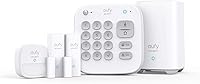
| Ring Alarm 8-Piece Kit (2nd Gen) | smaller homes | 4 contact sensors, 1 motion detector | Keypad and Ring app | Wi-Fi outage support with a compatible Ring Protect Plan | 9.1 |
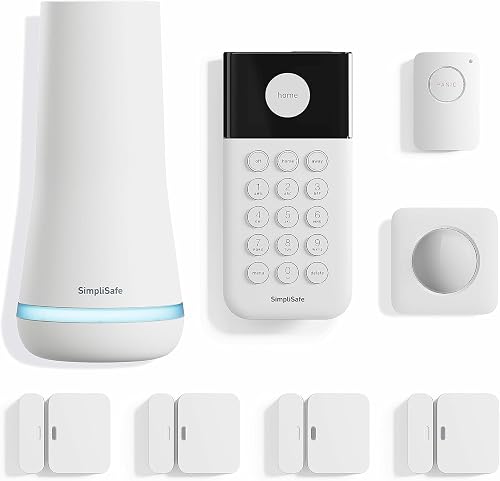
| SimpliSafe 8-Piece Wireless System | monitored households | 4 entry sensors, 1 motion sensor | Keypad and SimpliSafe app | Built-in network backup requires professional monitoring | 8.9 |
| Ring Alarm Pro 8-Piece Kit | replacing your router | 4 contact sensors, 1 motion detector | Wi-Fi outage support with a compatible Ring Protect Plan | 8.0 | |
| Ring Alarm Pro 14-Piece Kit | multiple entrances | 8 contact sensors, 2 motion detectors | 2 keypads | Wi-Fi outage support with a compatible Ring Protect Plan | 7.6 |
| Ring Power Pack Backup Battery | longer power outages | 7.1 |
Which home security system with cellular backup fits your home?
Choose the standard Ring kit for a smaller sensor layout, SimpliSafe for a household that wants professional monitoring, or Ring Alarm Pro when an integrated router is part of your plan. The larger Pro bundle adds equipment coverage rather than a different stated backup service.
Ring Alarm 8-Piece Kit (2nd Gen): Best for smaller homes
- Base station and keypad
- Four contact sensors
- Motion detector and range extender
- Wi-Fi outage support with a compatible Ring Protect Plan
A practical starting point for a 1–2 bedroom home that needs entry sensors and room coverage. Choose it when you want an alarm kit without an integrated router.
Pros
- Contact and motion sensors in one kit
- Mobile notifications when triggered
- Supports additional Alarm Sensors and accessories
Cons
- Wi-Fi outage support requires a compatible plan
- Confirm cellular service and supported outage functions
The standard Ring kit is the most direct choice for a 1–2 bedroom home that needs entry protection and a motion detector. It includes a base station, keypad, 4 contact sensors, 1 motion detector, and a range extender.
Use the contact sensors on the openings you most need to monitor, then choose a room or passage for motion coverage. Count those locations first so the kit does not leave a frequently used side door uncovered.
The Ring app provides mobile notifications when the alarm is triggered and lets you monitor Ring devices together. A compatible Ring Protect Plan adds remote arming and support for keeping the system online when Wi-Fi goes down.
Buy this kit if your existing router already meets your needs. Skip it if you want the integrated eero router, or if your initial sensor map clearly calls for a larger bundle.
Our Ring Alarm cellular backup guide covers the service questions to settle alongside the hardware choice.
SimpliSafe 8-Piece Wireless System: Best for monitored households
- Base station, keypad, 4 entry sensors, motion sensor and panic button
- Base station battery lasts up to 24 hours
- Network backup requires professional monitoring
A wireless kit for US households that want professional monitoring and a separate panic button. Its built-in network backup requires a monitoring plan.
Pros
- No wiring or drilling required
- Remote app arming and disarming
- Professional monitoring has no long-term contract
Cons
- Network backup and panic button dispatch require professional monitoring
- Products and monitoring are offered and supported only in the US
SimpliSafe suits a US household that wants a wireless installation and plans to use professional monitoring. The kit includes a base station, keypad, 4 entry sensors, a motion sensor, and a panic button.
Setup involves plugging in the base station, downloading the app, and placing the sensors, with no wiring or drilling required. That approach is useful when you want to avoid routing cables through finished walls.
SimpliSafe says its base station battery lasts up to 24 hours, with built-in network backup for power outages requiring professional monitoring. Its panic button also requires that service for police dispatch, including the silent panic option.
Choose it if monitoring is part of your plan, especially if a separate panic button would be useful to your household. Skip it outside the US, or if you want its network backup while avoiding professional monitoring.
Compare the responsibilities of each approach in our guide to self-monitored home security systems.
Ring Alarm Pro 8-Piece Kit: Best for replacing your router
- Alarm Pro base station with eero Wi-Fi 6 router
- Four contact sensors and one motion detector
- Setup through Ring and eero apps
Combines an alarm kit with an eero Wi-Fi 6 router for buyers who want both in one base station. Its smaller sensor set suits a focused entry-point plan.
Pros
- Alarm and router in one base station
- Expandable with Alarm Sensors and eero 6 extenders
- Supports compatible Ring security accessories
Cons
- Wi-Fi outage support requires a compatible plan
- Adds router setup to alarm installation
The Ring Alarm Pro 8-Piece Kit suits buyers who want to handle alarm setup and a home network change together. Its base station includes an eero Wi-Fi 6 router, alongside a keypad, 4 contact sensors, 1 motion detector, and a range extender.
Ring describes router speeds up to 900 Mbps and coverage up to 1,500 sq. ft. Actual coverage depends on placement and the building, so use your floor plan rather than that area claim alone.
Installation uses both the Ring and eero apps. Set aside time to reconnect household devices if your network name or password changes, especially devices that other people depend on.
Choose this kit when the router is a useful part of the package and the smaller sensor set covers your first installation. Skip it if you are happy with your current network and only need an alarm.
Ring offers plan-dependent Wi-Fi outage support here too; the router itself should not be treated as proof of cellular service or backup internet for every device.
Ring Alarm Pro 14-Piece Kit: Best for multiple entrances
- Two keypads, 8 contact sensors and 2 motion detectors
- Alarm Pro base station with eero Wi-Fi 6 router
- Alarm range extender included
The larger Pro kit suits homes that need sensors at more openings and keypad access in two places. Choose it for the equipment count, rather than assuming more pieces mean stronger backup.
Pros
- More entry and motion sensors than the Pro 8-piece kit
- Two keypad locations
- Integrated eero Wi-Fi 6 router
Cons
- Wi-Fi outage support requires a compatible plan
- Extra equipment may be unnecessary for a smaller layout
The Ring Alarm Pro 14-Piece Kit suits a home with several entrances or a layout that benefits from controls in 2 places. It includes 8 contact sensors, 2 motion detectors, and 2 keypads, plus the Pro base station and a range extender.
The extra keypad can be useful when people regularly enter through different doors. Choose locations based on daily routines, such as the main entrance and the door used from a garage.
Its integrated router serves the same buying purpose as the smaller Pro kit. The reason to choose this bundle is the larger sensor and keypad set, not an assumption that more pieces improve outage communication.
Buy it when you can assign the extra equipment to useful locations now. Skip it if several sensors would stay in a drawer, or if you want more entry coverage without changing your router.
Alarm Sensors and eero 6 extenders can be added separately, so a larger bundle does not need to dictate your entire future setup.
Ring Power Pack Backup Battery: Best for longer power outages
- Backup battery for Alarm Pro and eero 6 extenders
- Adds up to 8 hours of Alarm Pro battery life
- Three packs can power Alarm Pro for 24 hours, depending on use
A power accessory for compatible Alarm Pro equipment during outages. It adds battery runtime but does not provide a separate communication service.
Pros
- Extends Alarm Pro battery runtime
- Stackable design
- Supports compatible eero 6 extenders
Cons
- Compatible alarm equipment is sold separately
- Not a standalone alarm or cellular connection
The Ring Power Pack is for buyers who already have, or plan to buy, compatible Alarm Pro equipment and want more runtime during a power failure. It is a battery accessory, not an alarm kit or a mobile-network service.
Ring says 1 pack extends Alarm Pro battery life by up to 8 hours. Connecting 3 packs can keep the base station powered for 24 hours, depending on use.
It supports the Alarm Pro Base Station and eero 6 extenders, which are sold separately. Do not assume that compatibility extends to the standard Ring Alarm base station or to another router.
Choose it after you have identified which equipment needs power through an outage. Skip it as your first security buy, or if your only problem is a failed internet connection while household power remains available.
Plan for the whole communication path as well as the base station, since keeping one device powered does not keep every other device online.
What should backup keep working during an outage?
Your backup plan should preserve the alarm functions you depend on, not just keep an indicator light on. Separate local detection, communication with a monitoring service, and your own remote access when comparing features.
A door sensor detecting an opening, a siren sounding, and a phone receiving an alert are different steps. A disruption can affect one step without affecting all the others.
For a plain explanation of those roles, read how a home security system works. That distinction helps you ask precise questions instead of accepting “backup included” as a complete answer.
Does a home security system with cellular backup need a subscription?
The outage services described for these kits require a plan. Ring ties Wi-Fi outage support to a compatible Ring Protect Plan, while SimpliSafe requires professional monitoring for its built-in network backup.
Before enrolling, ask which plan supports your exact model and address. Then ask separately about alarm signals, professional monitoring, phone notifications, and remote arming during an internet outage.
Also ask what happens if the plan expires or is canceled. Do not assume the hardware's presence means the backup communication service remains active.
Our guide to home security monthly fees explains the recurring costs to compare. Include the service you actually need when weighing the full system cost.
Will alarm backup keep cameras and home internet online?
Do not assume alarm backup covers cameras or general internet use. A connection that carries alarm messages may have different limits from one that supports video, browsing, or other household devices.
If camera access matters during an outage, ask specifically about live views, recording, and uploads. Also identify how each camera receives power, because a working alarm connection cannot power a separate camera.
For a home office, treat work calls and computer access as a separate requirement. Ask about supported devices, service limits, and any usage conditions before building your internet plan around an alarm.
Can cellular backup fail too?
Cellular backup still depends on signal and an available mobile network. It adds another communication route, but it does not make the system independent of outside infrastructure.
Ask which network the service uses and whether coverage can be checked at the planned base station location. Your phone's reception is only a rough clue if it uses a different network.
A local disruption can also affect more than one service. Plan household contact methods for an outage instead of assuming the alarm will handle every communication need.
How many sensors and keypads does your home need?
Count useful sensor locations before counting kit pieces. Base stations, keypads, and range extenders contribute to a bundle's total, but they do not each protect another opening.
Start with exterior doors, including less obvious entrances such as a side or basement door. Then consider accessible windows and decide which openings need individual alerts.
Motion coverage can help monitor movement inside a room or passage. It does not tell you that a particular window opened, and it needs placement that suits the room's normal activity.
For a household with pets, check the motion sensor's placement guidance before choosing a location. SimpliSafe describes its motion sensor as suitable for pets under 60 lb, but positioning still deserves care.
Place keypads where people can reach them during the normal entry delay. A second keypad earns its place when it makes arming or disarming easier from another regularly used entrance.
Write each proposed location beside a sensor on paper before buying. Our DIY alarm kit selection guide can help you turn that map into a suitable starter kit.
How should you set up an alarm for outage readiness?
Set up and check the normal alarm operation first, then confirm the backup service through the brand's approved process. That order makes it easier to spot a sensor problem separately from a connection problem.
Choose the base station location before attaching sensors
Place the base station according to the manufacturer's guidance, with access to suitable power and the connections it needs. Avoid hiding it somewhere that makes status lights, cables, or battery access hard to reach.
Check communication from each planned sensor location before fixing everything in place. Thick walls, metal surfaces, and distance can affect wireless links, so a position that looks tidy may not be the best working location.
For an integrated router, also consider the devices and rooms that need Wi-Fi. Do not choose a poor network location simply because it is beside the most convenient doorway.
Name sensors and set entry routines clearly
Give each sensor a name that identifies the actual location, such as “kitchen side door.” Clear names make an alert more useful and reduce confusion when someone needs to check an opening.
Set entry and exit delays around your household's normal route, following the available settings and brand guidance. Everyone who uses the system should know which mode to choose when staying home or leaving.
Practice arming, disarming, and responding to an open-door warning. Keep access codes private and review who still needs access when household arrangements change.
Check the backup path without causing an emergency dispatch
Use the manufacturer's approved system-check procedure, and coordinate with the monitoring service before deliberately triggering an alarm. Follow its instructions for avoiding an unnecessary emergency response.
Ask support how to confirm an internet interruption, a power interruption, and restoration of normal service. Check the resulting status messages rather than relying only on a powered base station.
Record the plan name, support instructions, and any limits that matter to you. Keep those notes somewhere accessible if your usual internet connection is unavailable.
What care keeps backup useful after installation?
Keep the subscription, batteries, and household instructions current. A backup plan can become less useful after a canceled service, an ignored warning, or a change to the network.
Check app and keypad warnings regularly, and replace sensor batteries using the correct type and procedure. The base station's outage battery does not replace the batteries in separate wireless sensors.
For SimpliSafe equipment, our battery replacement guide explains the next maintenance step. Avoid treating a base station runtime figure as a replacement schedule for every component.
Recheck sensor alignment after painting, replacing a door, or adjusting a window frame. Adhesive mounts and the gap between sensor parts deserve attention when the surrounding surface changes.
After changing your router, internet provider, or Wi-Fi credentials, confirm that the alarm has returned to its normal connection. Also review emergency contacts and account details when phone numbers or household members change.
Following a power outage, check for normal power, connection, and battery status once service returns. Use the brand's charging guidance before assuming the system is ready for another extended interruption.
Which buying mistakes leave gaps in protection?
The most costly mistake is buying around the word “backup” without defining the failure you need covered. Match each purchase to power, communication, sensor coverage, or monitoring rather than expecting one feature to solve all 4.
Buying a battery to solve an internet outage
A battery helps when equipment loses electricity. If the problem is a broadband failure while power stays on, you need a supported alternate communication path.
The reverse mistake matters too: a cellular service cannot keep unpowered equipment running. Review both needs if storms or local outages commonly affect power and internet together.
Choosing the largest bundle before mapping the home
A larger kit is useful only when its parts have suitable locations. Extra motion sensors may not address a need for more individually monitored windows.
Map your first installation and likely additions separately. That gives you a clearer choice between a suitable starter kit and a bundle whose extra equipment you will use immediately.
Confusing professional monitoring with a guaranteed response
Professional monitoring adds people who can act on alarm information under the service's procedures. It does not promise that an emergency responder will arrive within a fixed time.
Keep contact details accurate and learn how the service handles alarm verification. Household members should also know what to do if they accidentally trigger the system.
Leaving the plan decision until after installation
A kit can meet your sensor needs while the available service does not meet your outage requirements. Resolve that mismatch before mounting the hardware.
Confirm service availability, required enrollment, and the features that remain after any included trial ends. Buy for the ongoing arrangement you intend to keep.
Which system should you choose?
Choose the Ring Alarm 8-Piece Kit (2nd Gen) when you need a smaller entry-focused alarm and your current router already serves you well. Choose SimpliSafe when professional monitoring is part of your plan and its wireless kit and panic button fit your household.
Pick the Pro 8-piece kit if you also want an integrated router, or the Pro 14-piece kit when you have clear uses for more sensors and 2 keypad locations. Add the Power Pack only for compatible equipment that needs more battery runtime.
For a home security system with cellular backup, make confirmed cellular service and suitable coverage a condition of buying. Start with Does Ring Alarm Have Cellular Backup? to prepare the connection and plan questions before you enroll.
Our top 3 picks at a glance
-
1
-
2
-
3
Frequently asked questions
What does cellular backup do in a home security system?
Cellular backup gives an alarm a mobile-network path when its usual internet connection fails. It does not supply electrical power, so a power outage also calls for battery support.
Before choosing a plan, confirm whether the backup path carries alarm signals, app commands, notifications, or any other functions you need.
Does Ring Alarm have cellular backup?
Ring describes Wi-Fi outage support with a compatible Ring Protect Plan, but that description does not identify the backup connection as cellular. Ask Ring to confirm the exact kit, plan, and supported outage functions.
Our Ring Alarm cellular backup guide explains which service details to check before you commit.
Does SimpliSafe include network backup?
The SimpliSafe 8-Piece Wireless System includes built-in network backup for power outages when professional monitoring is active. Its base station battery lasts up to 24 hours, according to SimpliSafe.
Confirm the backup connection type and functions before enrolling; SimpliSafe products and monitoring services are offered and supported only in the US.
Is a backup battery the same as cellular backup?
No, a backup battery supplies electricity, while cellular backup supplies a mobile-network communication path. An alarm can remain powered without having a working route to a monitoring service.
The Ring Power Pack extends runtime for compatible equipment, so pair power planning with a separate check of communication backup and plan requirements.