7 Best DIY Home Security Systems (October 2026)
The best DIY home security systems include the Ring Alarm 8-Piece Kit (2nd Gen) for smaller homes, the Ring Alarm 14-Piece Kit for multiple entrances, and the SimpliSafe 8-Piece Wireless System for accessible panic controls.
On this page (7 sections)
- Best DIY home security systems for different needs
- How to choose a DIY home security system
- Do DIY security systems need a monthly fee?
- How to set up a DIY alarm without leaving coverage gaps
- How to keep a DIY security system useful after installation
- Common mistakes that lead to the wrong alarm kit
- Which DIY home security system should you choose?
The best DIY home security system for most smaller homes is the Ring Alarm 8-Piece Kit (2nd Gen), if its entry coverage matches your layout. Choose the larger Ring kit for more openings, SimpliSafe for a panic button or indoor camera, or eufy for alerts without monthly fees.
Start with the doors and windows you want monitored, then decide who should respond to an alarm. A bundle can fit your floor plan yet still be the wrong choice if essential app functions require a subscription you don't want.
For the basics, read our guide to DIY home alarm systems. If the ongoing commitment is your main concern, start with how home alarm monthly fees work.
Our picks at a glance
-
1

-
2
-
3
 Best for accessible panic controls
SimpliSafe 8-Piece Wireless System
8.9/10 our score
See it on Amazon
- 4
 Best for single-entry apartmentsCheck it
 - 5
 Check it
SimpliSafe 9-Piece System with HD Camera
Best for indoor visual checks - 6
 Best for avoiding monthly feesCheck it
 - 7
 Best for home network upgradesCheck it
Best DIY home security systems for different needs
The Ring Alarm 8-Piece Kit (2nd Gen) offers the most useful starting balance here for smaller homes. Other picks solve specific needs, including more entry coverage, a separate panic control, indoor viewing or a home network upgrade.
We compared included hardware, setup requirements, controls and service dependencies. The order reflects overall fit for this search; your entry count and response plan should decide your final choice.
| Product | Best for | Included sensors | Controls | Monitoring | Our score |
|---|---|---|---|---|---|
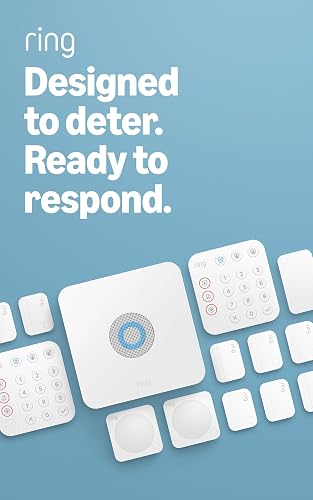
| Ring Alarm 8-Piece Kit (2nd Gen) | smaller homes | 4 contact sensors, 1 motion detector | Keypad and Ring app | Optional professional monitoring | 9.1 |
| Ring Alarm 14-Piece Kit | multiple entrances | 8 contact sensors, 2 motion detectors | 2 keypads and Ring app | Optional professional monitoring | 9.0 |
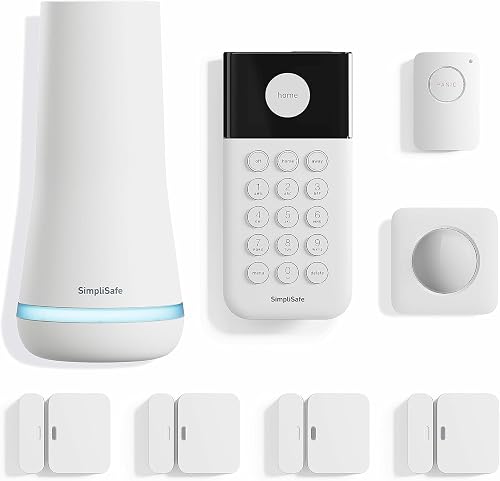
| SimpliSafe 8-Piece Wireless System | accessible panic controls | 4 entry sensors, 1 motion sensor | Wireless keypad and SimpliSafe app | Optional professional monitoring | 8.9 |
| Ring Alarm 5-Piece Kit | single-entry apartments | 1 contact sensor, 1 motion detector | Keypad and Ring app | Optional professional monitoring | 8.8 |
| SimpliSafe 9-Piece System with HD Camera | indoor visual checks | 4 entry sensors, 2 motion sensors | Optional professional monitoring | 8.4 | |
| eufy 5-Piece Home Alarm Kit | avoiding monthly fees | 2 entry sensors, 1 motion sensor | Keypad and eufy Security app | 8.2 | |
| Ring Alarm Pro 8-Piece Kit | home network upgrades | 4 contact sensors, 1 motion detector | Optional professional monitoring | 8.0 |
Ring Alarm 8-Piece Kit (2nd Gen): Best for smaller homes
- Four contact sensors
- One motion detector
- Keypad and range extender
- Ring app alerts
A useful starting kit when several doors or windows need individual sensors. Choose it if you want Ring app alerts and the option to add compatible sensors later.
Pros
- Covers four selected doors or windows
- Mobile alerts through the Ring app
- Supports additional compatible sensors
Cons
- Remote arming and alarm connectivity backup require a compatible Ring Protect Plan
- Professional monitoring requires a compatible plan
Choose this Ring kit when you need several openings covered from day one without starting with the largest bundle. Ring positions it for 1- to 2-bedroom homes, but a floor plan with many accessible windows may need more sensors.
The box contains a base station, keypad, four contact sensors, one motion detector and a range extender. That gives you individual entry alerts plus motion coverage for a room or hallway.
Place the keypad along your normal arrival route so arming and disarming becomes part of leaving and coming home. The Ring app sends notifications when the alarm is triggered, and compatible sensors can be added later.
The main buying decision is the service plan: remote arming, alarm connectivity backup and professional monitoring require a compatible Ring Protect Plan. Skip this kit if you need those functions but want to avoid subscriptions.
It is also the wrong starting size if your coverage map already calls for substantially more entry sensors. Resolve that gap before ordering rather than leaving selected openings uncovered.
Ring Alarm 14-Piece Kit: Best for multiple entrances
- Eight contact sensors
- Two motion detectors
- Two keypads
- Ring app alerts
The larger sensor set suits homes with several accessible openings. Two keypads also let household members use separate arrival points.
Pros
- Eight contact sensors included
- Two motion detectors and keypads
- Supports additional compatible sensors
Cons
- Remote arming and alarm connectivity backup require a compatible Ring Protect Plan
- Professional monitoring requires a compatible plan
Choose the larger Ring kit when multiple entrances and accessible windows need their own sensors. Ring positions it for 2- to 4-bedroom homes, though the number of openings matters more than the bedroom label.
It includes eight contact sensors, two motion detectors, two keypads, a base station and a range extender. The second keypad is especially useful when household members regularly enter through different doors.
Before choosing it, assign each included sensor to a real location on a sketch. That shows whether the bundle solves your coverage needs or simply adds devices you don't expect to use.
Two motion detectors also let you plan separate room or hallway coverage instead of relying on a single central location. Place them around how people move through the home, following the installation instructions.
Skip this kit for a small apartment with only a few chosen openings. It shares the smaller Ring kits' subscription requirements, so the extra hardware does not remove the need to review service features.
SimpliSafe 8-Piece Wireless System: Best for accessible panic controls
- Four entry sensors
- One motion sensor
- Panic button
- Wireless keypad
The included panic button suits households that want a separate way to trigger an alarm. Its silent option and police dispatch function require professional monitoring.
Pros
- Panic button included
- No wiring or drilling required for setup
- App supports remote arming and disarming
Cons
- Panic button police dispatch requires professional monitoring
- Products and monitoring are sold and supported only in the US
Choose this SimpliSafe bundle when a separate panic button is part of your household's plan. It gives someone a way to trigger the alarm without opening an app or waiting for an entry sensor to activate.
The kit pairs that button with a base station, wireless keypad, four entry sensors and one motion sensor. Setup involves plugging in the base station, downloading the app and placing devices, with no wiring or drilling required.
Discuss the panic button's location and purpose with everyone who may use it. Its silent option and police dispatch function require 24/7 professional monitoring, so include that service decision before relying on those functions.
The SimpliSafe app supports remote arming and disarming, while Alexa and Google Assistant support at-home voice arming. Entry sensors can also provide Secret Alerts for selected private areas without sounding the alarm.
Skip this bundle if an included camera is essential, or if you live outside the US, where SimpliSafe does not offer these products and monitoring services for sale or support.
Ring Alarm 5-Piece Kit: Best for single-entry apartments
- One contact sensor
- One motion detector
- One keypad
- Ring app alerts
A small starting kit for an apartment where one door is the main entry concern. Choose a larger bundle if several openings need individual coverage immediately.
Pros
- Focused sensor set for a small space
- Mobile alerts through the Ring app
- Supports additional compatible sensors
Cons
- Only one contact sensor is included
- Remote arming and alarm connectivity backup require a compatible Ring Protect Plan
Choose the smallest Ring bundle for a limited entry plan, such as an apartment where the front door is the main opening you want monitored. Its size works only if you understand what remains outside that plan.
The kit includes one contact sensor, one motion detector, a keypad, base station and range extender. A nearby room can receive motion coverage, but the motion detector does not give every window its own opening alert.
Walk through the apartment before deciding this is enough. A patio door, accessible bedroom window or second entrance may make a larger starting bundle more practical.
Compatible Ring sensors can be added later, so this can also suit someone building coverage in stages. Set a clear priority for those additions rather than assuming a small bundle covers the entire home.
Skip it if several openings need individual sensors immediately. It also follows the other Ring kits' plan requirements for remote arming, alarm connectivity backup and professional monitoring.
SimpliSafe 9-Piece System with HD Camera: Best for indoor visual checks
- Four entry sensors
- Two motion sensors
- SimpliCam wired indoor camera
- App control
Choose this bundle when viewing an indoor room matters alongside entry alerts. The included camera has a built-in shutter for privacy control.
Pros
- Indoor camera included
- Two motion sensors
- App supports remote arming and disarming
Cons
- Indoor camera needs wired power
- Products and monitoring are sold and supported only in the US
Choose this SimpliSafe bundle when seeing an indoor room is part of how you want to handle alerts. The SimpliCam wired indoor camera lets you view the space from your phone and has a built-in stainless steel privacy shutter.
Alongside the camera, the bundle includes a base station, keypad, four entry sensors and two motion sensors. That combination suits someone who wants entry detection, movement coverage in separate spaces and an indoor view.
Plan the camera location around both its view and its need for wired power. Keep the cord out of walking routes, and agree with household members on where the camera should point and when to use the shutter.
The app supports remote arming and disarming, with optional professional monitoring available. As with the other SimpliSafe bundle here, products and monitoring services are sold and supported only in the US.
Skip this bundle if your real need is outdoor footage or a camera at every entrance. One indoor camera does not provide those views, and this bundle does not include the other SimpliSafe kit's panic button.
eufy 5-Piece Home Alarm Kit: Best for avoiding monthly fees
- Two entry sensors
- One motion sensor
- Keypad and HomeBase
- App alerts
A focused choice for buyers who want to handle app alerts themselves without a monthly fee. Map your openings first because the included entry coverage is limited.
Pros
- No monthly fees
- App alerts for motion or a breach
- Included mounts for motion sensor and keypad
Cons
- Only two entry sensors are included
- Confirm service options separately if emergency dispatch is essential
Choose eufy when avoiding monthly fees is the deciding factor and you want to manage app alerts yourself. The eufy Security app notifies you when motion or a breach is detected.
The kit contains HomeBase, a keypad, two entry sensors and one motion sensor. Entry sensors attach to doors and windows, while included mounts let you secure the motion sensor and keypad to walls.
This is a focused starting point for a small coverage plan. Assign the entry sensors to your highest-priority openings, then decide whether movement coverage serves the remaining room layout.
Self-managed alerts need a practical response plan: decide who receives them, who can check the situation and what to do when your phone is unavailable. A notification alone does not arrange emergency help.
Skip this kit if professional dispatch is your central requirement unless you have separately confirmed a suitable service arrangement. Also choose more entry coverage if your plan includes several doors and accessible windows from the start.
Ring Alarm Pro 8-Piece Kit: Best for home network upgrades
- Built-in eero Wi-Fi 6 router
- Four contact sensors
- One motion detector
- Ring and eero app setup
An alarm kit with an integrated eero router for buyers planning their home network too. Choose standard Ring Alarm if your current router already meets your needs.
Pros
- Built-in eero Wi-Fi 6 router
- Four contact sensors included
- Supports additional Alarm sensors and eero 6 extenders
Cons
- Requires setup through Ring and eero apps
- Remote arming, alarm connectivity backup and professional monitoring require a compatible plan
Choose Ring Alarm Pro when the alarm and home network need attention together. Its base station includes an eero Wi-Fi 6 router, giving it a different purpose from the standard Ring bundles.
The security hardware includes four contact sensors, one motion detector, a keypad and an Alarm Range Extender. Setup uses both the Ring and eero apps, so allow time to plan the network as well as sensor placement.
Ring claims router speeds up to 900 Mbps and coverage up to 1,500 sq. ft. Treat those as planning limits, since walls, placement and your internet service affect the connection you get.
Additional Alarm sensors and eero 6 extenders are sold separately. The included Alarm Range Extender and optional eero extenders serve different roles, so don't assume extending alarm communication also expands Wi-Fi coverage.
Skip Pro if your current router already suits your home and you only need an alarm kit. Its integrated router does not remove the subscription requirements for remote arming, alarm connectivity backup or professional monitoring.
How to choose a DIY home security system
Choose by coverage, response and daily use, in that order. A kit needs enough sensors for your chosen openings, a workable way to handle alarms and controls your household will actually use.
Bedroom counts help narrow the options, but they don't describe accessible windows, side doors or detached spaces. Make a simple floor plan before comparing bundles.
How many sensors should your DIY home security system include?
Plan an entry sensor for each opening you want monitored individually. Start with exterior doors and accessible windows, then identify rooms or routes where motion detection adds useful coverage.
Separate your map into required coverage and later additions. This keeps optional cabinet alerts from taking priority over an exterior door you meant to protect.
Count devices by function rather than the total number of pieces in the bundle. Base stations, keypads and extenders count toward kit size but do not each monitor another opening.
A room motion sensor also serves a different purpose from a contact sensor. Read our guide to door and window alarm sensors if you need help deciding which openings deserve individual alerts.
Should you choose motion detection or an indoor camera?
Use motion detection to identify movement and a camera when you also want a view of the space. Neither replaces a contact sensor's ability to identify a particular door or window opening.
Think through where household members and pets move while the alarm is armed. Follow the brand's placement guidance rather than assuming a pet-related claim applies to every animal, mounting position or room.
For an indoor camera, choose a useful view that respects private areas. A view of a shared entry route may serve your purpose better than a wide view into everyday living spaces.
If video is central to your decision, compare the coverage you need in our guide to DIY home security systems with cameras. The camera bundle here provides an indoor view, not a complete outdoor camera plan.
Who will respond when an alarm arrives?
Choose self-monitoring only if someone can receive and act on alerts. Professional monitoring adds a service that can contact emergency responders, but it does not promise a particular arrival time.
For self-monitoring, agree on a primary contact and a backup person who can help when you are driving, asleep or away from your phone. Decide how to handle an uncertain alert without entering a potentially unsafe situation.
Professional monitoring may better suit a household that cannot reliably manage notifications throughout the day. Review contact procedures and any local alarm requirements before activating service.
Our guide to self-monitored home security systems explains the responsibilities that remain with you.
Do DIY security systems need a monthly fee?
Some DIY systems provide useful functions without a monthly fee, but hardware ownership and service access are separate decisions. eufy offers this alarm kit without monthly fees, while Ring and SimpliSafe offer optional professional monitoring.
For Ring, a compatible plan is required for remote arming and keeping the alarm online if Wi-Fi goes down. Receiving a triggered-alarm notification is a different function from remotely changing the alarm's state.
Compare the full setup, not just the starter box
Build your budget around the complete coverage plan: required sensors, any camera needs, mounting supplies and the service functions you intend to keep. A smaller bundle may need additions immediately.
Don't let an introductory monitoring period decide the purchase. Read the ongoing terms and identify which features you would lose if you chose not to continue.
Our guide to home security systems without a monthly fee helps compare that approach. For outages, separately review home security systems with cellular backup rather than assuming wireless sensors mean the alarm has a backup connection.
How to set up a DIY alarm without leaving coverage gaps
Install the system in stages: plan, connect, place and verify. Finish the initial app setup and confirm device communication before committing to final mounting locations.
Map and label devices before mounting
Give sensors clear names such as “back door” or “office window.” Specific names make alerts easier to understand than a series of numbered devices.
Follow the supplied gap and alignment instructions for each contact sensor and magnet. Check that the door or window can open and close normally without striking either part.
For adhesive mounts, prepare the surface as instructed and allow any required bonding time. Renters should also check the lease and permitted mounting methods before attaching devices.
Check placement with the household's routine
Choose a keypad location that works with your usual entrance and the system's entry delay settings. Everyone who uses the alarm should know the route to it and how to disarm.
Place motion sensors according to the brand's guidance, accounting for furniture, pets and moving objects. Avoid improvising mounting heights based on how much of the room seems visible.
Use the system's guided check or practice mode where available, following its instructions. If professional monitoring is active, follow the provider's procedure before intentionally triggering devices.
Confirm what happens during an outage
Check backup power and backup communication separately. A powered base station, connected router and working phone connection each play different roles in getting an alert to you.
Review the exact service requirements for any backup function you plan to use. Don't disconnect household equipment or trigger live alarms without following the system's instructions and monitoring procedures.
If the mounting or network setup exceeds what you want to handle, compare DIY and professional home alarm installation before leaving the job partly finished.
How to keep a DIY security system useful after installation
Keep the system useful by checking device status and practicing the daily routine. Revisit the setup after furniture moves, a new pet, a changed entrance routine or work on doors and windows.
Use the app's device and battery notices, and replace batteries according to the manufacturer's instructions. Avoid treating a base station's backup duration as the replacement schedule for every sensor.
Keep sensors and mounting points clean, dry and secure using the care guidance supplied with them. A loose contact sensor or shifted magnet can undermine an otherwise sensible placement plan.
Secure the account with a strong, unique password and enable additional sign-in protection where available. Review shared access when household members move out or someone no longer needs control.
For a camera, periodically confirm that its view still serves the intended purpose and that the privacy shutter is being used as agreed. A shelf move or new decoration can change the view without anyone noticing.
Common mistakes that lead to the wrong alarm kit
The most common buying mistake is choosing by bundle size instead of a coverage map. A large piece count can still leave you short of the particular sensors your home needs.
- Assuming every window is covered by one room sensor: motion detection and individual opening detection provide different information.
- Buying a camera for the wrong view: an indoor camera cannot supply a view from an outdoor location.
- Ignoring household use: a system left disarmed because its controls are inconvenient cannot follow your intended routine.
- Treating notifications as dispatch: app alerts require someone to assess them and arrange help.
- Planning only around Wi-Fi: check power and communication backup as separate needs.
- Adding smart features before basic coverage: cover your selected entrances before spending attention on voice control or extra private-area alerts.
Write down any compromise before buying. Knowing that one accessible opening will remain uncovered is better than discovering later that the bundle never matched your plan.
Which DIY home security system should you choose?
The best DIY home security system is the one that covers your chosen openings and fits your response plan. Make the final choice from your floor plan and the functions you are willing to support over time.
Choose the Ring Alarm 8-Piece Kit for a smaller home with several openings, or the 14-Piece Kit when you need broader entry coverage and separate keypad locations. The 5-Piece Kit fits a focused apartment plan with one main entry concern.
Choose SimpliSafe's 8-Piece System when a panic button is part of the plan, or its camera bundle when indoor viewing matters. Pick eufy for self-managed alerts without monthly fees, and Ring Alarm Pro when you also want to build around its integrated router.
Before ordering, assign every sensor a location and confirm the service requirements for your essential functions. If both leading brands still fit, use our Ring Alarm vs SimpliSafe comparison to settle the choice.
Our top 3 picks at a glance
-
1
-
2
-
3
Best for accessible panic controls
SimpliSafe 8-Piece Wireless System
8.9/10 our score
See it on Amazon
Frequently asked questions
What is the best DIY home security system?
The Ring Alarm 8-Piece Kit (2nd Gen) is our first choice for smaller homes needing several entry sensors and room to expand. Choose by your coverage map, though: a larger home may need the 14-Piece Kit, while an apartment with one main entrance may need less hardware.
Can a DIY home security system work without professional monitoring?
Yes, a DIY system can provide alerts you manage yourself without professional monitoring. The eufy kit offers app alerts without monthly fees, and Ring provides triggered-alarm notifications; check each function separately: Ring requires a compatible plan for remote arming and keeping the alarm online if Wi-Fi goes down.
How many sensors do I need for a DIY alarm system?
Plan one contact sensor for each door or window you want monitored individually, then add motion coverage where it serves your layout; count accessible openings before choosing a bundle. A motion sensor can cover movement in a room, but it does not tell you which unmonitored window opened.
Is a DIY home security system hard to install?
These kits are designed for DIY setup, but careful placement matters more than rushing through installation. Map the sensors, connect the base station and follow the app instructions before mounting devices; check alignment and communication at every location, then show household members how to arm, disarm and handle alerts.
Should I choose Ring, SimpliSafe or eufy?
Choose Ring for its range of kit sizes and expandable sensor coverage, SimpliSafe for the included panic button or indoor camera in these bundles, and eufy for alerts without monthly fees. Then check the service requirements for your preferred functions and make sure the included hardware covers your chosen openings.