Ring Alarm vs SimpliSafe: Which Kit Is Better? (October 2026)
In the SimpliSafe vs Ring choice, pick Ring for households using Ring devices and Alexa; pick SimpliSafe for private-area alerts and a separate panic button. Check plan requirements before choosing, especially for remote controls, backup connectivity and emergency dispatch.
On this page (10 sections)
- SimpliSafe vs Ring: which kit fits your household?
- What does each 8-piece kit actually cover?
- Which app and voice controls will you use?
- What changes when you add professional monitoring?
- How should you plan sensors before ordering?
- What should you do during setup?
- How do the systems handle power or connection trouble?
- What care and habits keep the alarm useful?
- Which common buying mistakes should you avoid?
- SimpliSafe vs Ring: which should you choose?
Choose Ring Alarm if you already use Ring devices and want Alexa controls; choose SimpliSafe if quiet alerts and a separate panic button matter more. The useful SimpliSafe vs Ring comparison starts with how you'll use the alarm each day.
Both kits cover the same number of entry points, so the piece count won't settle the choice. Their extra devices, app controls and subscription requirements will.
Plan around your doors, windows and household routine before buying. A kit that everyone can arm correctly is more useful than an extra feature nobody remembers to use.

SimpliSafe vs Ring: which kit fits your household?
Ring suits a household built around Ring devices, while SimpliSafe suits people who want private-area alerts and a separate way to signal for help. Neither is the automatic choice just because it comes in an 8-piece box.
Start with 3 decisions: which openings need sensors, who will respond to alerts and whether you want professional monitoring. Those answers narrow the choice faster than comparing every small feature.
Ring lets you monitor Ring devices through its app and add Alarm sensors and accessories later. That makes it a sensible starting point when you want the alarm to join an existing Ring routine.
SimpliSafe's Secret Alerts serve a different need: knowing that a selected door or cabinet opened without sounding an alarm. Its panic button also gives you a control separate from the keypad and phone.
Don't choose around voice commands alone. Make sure every household member can use the keypad, understand the alarm routine and respond when a sensor reports an opening.
| Product | Best for | Kit contents | App | Voice control | Our score |
|---|---|---|---|---|---|
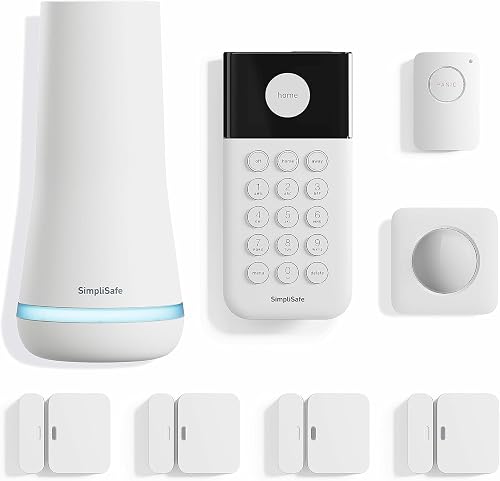
| Ring Alarm 8-Piece Kit (2nd Gen) | Alexa households | Base station, keypad, 4 contact sensors, motion detector, range extender | Ring app | Alexa arming and disarming with Ring Protect subscription | 9.1 |
| SimpliSafe 8-Piece Wireless System | shared households | Base station, keypad, 4 entry sensors, motion sensor, panic button | SimpliSafe App | Arming at home with Alexa and Google Assistant | 8.9 |
What does each 8-piece kit actually cover?
Both kits include a base station, keypad, 4 entry sensors and 1 motion sensor. Ring's remaining device is a range extender; SimpliSafe's is a panic button.
Count protected openings rather than bedrooms. A small home with several accessible windows can need more entry sensors than a larger home with fewer outside openings.
Ring vs SimpliSafe: Ring's fit for an expanding setup
Ring describes this kit as suitable for 1- to 2-bedroom homes. Its contact sensors detect doors or windows opening, while the keypad lets you arm and disarm the alarm.
The included range extender gives you another device to consider when planning placement. It doesn't replace the need to check communication at each sensor's final position.
Ring also supports additional Alarm sensors and accessories sold separately. Choose it if you expect your coverage plan to grow, but count those likely additions before comparing the full cost of the two systems.
Skip choosing Ring solely for the extender if your main concern is uncovered doors or windows. An extender helps with system communication; another entry sensor protects another opening.
SimpliSafe for private areas and a separate panic control
SimpliSafe's entry sensors can protect doors, windows and cabinets. Customizable Secret Alerts quietly notify you about access to selected private areas without sounding an alarm.
That can suit a home office or a cabinet you want to keep track of. In a shared home, agree on which areas need alerts so normal use doesn't create a stream of unwanted notices.
The panic button can sound the alarm and has a silent option for discreet signaling. Its emergency-dispatch function requires 24/7 Professional Monitoring, so factor that service into your decision if the button is a main reason for buying.
SimpliSafe sells and supports its products and professional monitoring services only in the US. Buyers elsewhere should skip this system rather than build a security plan around unsupported service.
Which app and voice controls will you use?
Ring brings Ring devices into one app, while SimpliSafe provides remote arming and disarming through its app. Choose around the controls you'll need when leaving, arriving and spending time away.
Ring sends mobile notifications when the system is triggered. Remote arming requires a compatible Ring Protect Plan, and Alexa arming and disarming require a Ring Protect subscription.
SimpliSafe supports voice arming at home with Alexa and Google Assistant. That gives Google Assistant households a clear reason to favor it when voice arming matters.
Keep voice arming and voice disarming separate in your comparison. The supplied SimpliSafe features cover voice arming, so don't assume it offers the same voice commands as Ring.
For daily use, place the keypad where you naturally enter and leave. Phone controls help when you're away, but they shouldn't be the only method your household understands.
Agree on who arms the system last and who checks alerts during work or travel. If you choose Ring, our guide to how to arm Ring Alarm can help you build that routine.
What changes when you add professional monitoring?
Professional monitoring adds a response service, while self-monitoring leaves you responsible for acting on alerts. Compare that responsibility separately from app access and backup features.
With self-monitoring, think through an ordinary missed alert. If your phone is silent during a meeting or you have no reception, decide who else can respond and what they should do.
Ring offers optional 24/7 professional monitoring for emergency police, fire and medical response through compatible plans. SimpliSafe offers optional professional monitoring with no long-term contract.
For SimpliSafe, panic-button dispatch and built-in network backup require a professional monitoring plan. Don't count on either function in a plan-free setup.
An alarm signal, a phone notification and emergency dispatch are different steps. Monitoring doesn't promise a particular arrival time, so keep household emergency plans clear regardless of the kit you choose.
Before subscribing, confirm the exact plan's features, service area and cancellation terms. Our guide to home security system monthly fees explains recurring service costs, while Ring Alarm without a subscription covers plan-dependent functions.
How should you plan sensors before ordering?
Assign each entry sensor to a specific opening before buying either kit. Four sensors can cover your highest-priority doors and windows, but they won't automatically cover every accessible route into a home.
Draw a simple floor plan and mark the outside doors first. Then mark reachable windows, including ones behind fences, near low roofs or away from the street.
Choose priorities based on access and daily use. Don't use an entry sensor on a cabinet until you've decided whether a more exposed outside opening needs it.
Plan the motion sensor around the room's sight lines. Furniture, tall shelves and open doors can block parts of a room, so choose placement with the brand's instructions in hand.
SimpliSafe gives its motion sensor a 35-foot detection range and 90-degree field of view. It recommends corner placement for room coverage and says the sensor works with pets under 60 lb.
Pet weight alone shouldn't decide placement. Follow the instructions for height and angle, and consider where pets climb or jump before relying on a chosen position.
For a broader approach to kit size and sensor planning, see how to choose a DIY alarm kit.
What should you do during setup?
Set up the base station and app first, then check devices before fixing them in place. This helps you catch poor placement or unclear device names while changes are easy.
SimpliSafe's setup involves plugging in the base station, downloading its app and placing the sensors, with no wiring or drilling required. Its wireless keypad doesn't need a plug, giving you more choice about where it goes.
For either system, follow the brand's mounting instructions and sensor-alignment rules. If adhesive mounting is used, clean and dry the surface first and allow any required bonding time.
Name sensors by location, such as “back kitchen window,” instead of leaving several with similar names. A clear alert tells you where to look without making you remember a device number.
Open and close each protected door or window and confirm that the system identifies it correctly. Check device communication at the final position, including doors closed and furniture in place.
Keep the panic button accessible to the person who needs it, if you choose SimpliSafe. Explain its purpose and follow the monitoring service's instructions for checking it without requesting an emergency response.
How do the systems handle power or connection trouble?
Separate loss of power from loss of internet service when planning backup protection. A system can still have power while losing its network connection, or lose household power while its network remains available.
SimpliSafe's base station has a battery that lasts up to 24 hours. Its built-in network backup requires professional monitoring, so battery backup and connection backup shouldn't be treated as the same feature.
Ring requires a compatible Ring Protect Plan to keep the system online when Wi-Fi goes down. Include that requirement in your decision if connection interruptions are a main concern.
Before choosing a plan, write down what you expect during each kind of outage. Confirm how you'll receive alerts, which controls remain available and whether the monitoring service can still receive a signal.
Don't assume the presence of a battery answers all those questions. Backup power, backup communication and emergency response each serve a different part of the security plan.
What care and habits keep the alarm useful?
Check sensor attachment, battery notices and household routines regularly. A loose sensor or an ignored warning can undermine a carefully planned setup.
Look for shifting sensor halves, loose mounts and furniture that now blocks the motion sensor. Repeat those checks after painting, replacing a door, moving a cabinet or rearranging a room.
Follow each brand's instructions for cleaning and battery replacement. Keep openings and controls free of dust, and avoid spraying liquid directly onto devices.
For SimpliSafe maintenance, our battery replacement guide can help you plan the job. Use the correct battery type for each device rather than assuming every part takes the same one.
Keep phone notification settings in mind, too. Check that alerts remain visible after changing phones, changing app permissions or setting a new quiet-hours routine.
Review who receives alerts when household members move in or out. Remove access that is no longer needed and make sure the remaining users know how to arm and disarm correctly.
Which common buying mistakes should you avoid?
Avoid comparing piece counts without comparing what the pieces do. A base station, motion sensor and panic button each count as one piece, but they solve different problems.
Don't spend your whole budget on the starter box before mapping coverage. Extra sensors and recurring service can change which system fits your needs.
Avoid choosing professional monitoring without discussing daily use with everyone at home. People need to know how to prevent accidental alarms and what to do if one occurs.
Don't buy a panic button expecting emergency dispatch without the required service. Likewise, don't choose Ring expecting all remote and voice controls to work without a subscription.
Skip either kit as a complete answer if your main need is camera footage. These bundles contain alarm devices, and their sensor coverage shouldn't be confused with video coverage.
Finally, don't choose a system around a feature you'll rarely use while overlooking your normal exit routine. Easy, consistent arming deserves more weight than an occasional voice command.
SimpliSafe vs Ring: which should you choose?
Choose Ring for an existing Ring household or a planned expansion of Alarm sensors. It is also the stronger fit here if Alexa arming and disarming are priorities and you're willing to subscribe.
Choose SimpliSafe if quiet access alerts, Google Assistant arming or a separate panic button solve a daily need. Its setup without wiring or drilling also suits buyers who want to avoid those installation steps.
Skip Ring if its main attractions depend on a plan you don't intend to keep. Skip SimpliSafe if you need support outside the US or expect panic-button dispatch without professional monitoring.
If the SimpliSafe vs Ring choice is still close, map your openings and write down the exact service features you need. Compare the complete setup and ongoing service rather than choosing by the starter kit alone.
For other starting points, browse our DIY home security kits guide. If ongoing service is the deciding factor, compare SimpliSafe's monthly cost with Ring's plan terms before you buy.
Frequently asked questions
Is SimpliSafe or Ring Alarm better?
Ring Alarm is the better fit if you already use Ring devices or want Alexa arming and disarming with a subscription. SimpliSafe is the better fit if you want quiet alerts for private areas or a separate panic button, provided its US-only sales and support suit you.
Do both kits include the same sensors?
Both kits include 4 sensors for entry points and 1 motion sensor, along with a base station and keypad. Their eighth device differs: Ring includes a range extender, while SimpliSafe includes a panic button, so choose that extra device around your home layout and daily needs.
Can you use either alarm without a subscription?
Both make professional monitoring optional, but that doesn't make every feature subscription-free: Ring ties remote arming and backup connectivity to a compatible plan, while SimpliSafe requires monitoring for panic-button dispatch and network backup. Compare Ring without a subscription and SimpliSafe without monitoring before deciding.
Which kit is easier to set up?
SimpliSafe has a clear setup path without wiring or drilling: plug in its base station, download the app and place the sensors. For either kit, the work that needs the most care is choosing sensor positions, naming devices clearly and checking that each protected opening reports correctly.
Which system is better for an apartment?
Choose around your apartment's entry points and household routine: SimpliSafe suits private-area alerts, while Ring suits households already using Ring devices. Four entry sensors may cover your main openings, but count them first and read our home alarm systems for apartments guide before choosing a kit.