5 Best Home Security Systems With No Monthly Fee (October 2026)
The best home security systems without monthly fees include the eufy Entry Sensor E20 for one extra doorway, the eufy 5-Piece Home Alarm Kit for small-home starters, and the eufy 7-Piece Essential Alarm System for multiple entrances.
On this page (9 sections)
- Which home security system with no monthly fee fits your needs?
- How these no-fee alarm picks differ
- How do you choose coverage without buying unnecessary sensors?
- What compatibility checks should you make before buying?
- How should you set up sensors and daily controls?
- What happens during an internet or power outage?
- How do you keep a no-fee alarm useful over time?
- Which buying and setup mistakes should you avoid?
- Which no-monthly-fee home security system should you choose?
The eufy 5-Piece Home Alarm Kit is our recommended complete home security system with no monthly fee for a small starting setup. Choose the 7-Piece Essential Alarm System when more doors or windows need individual coverage.
The highest-scoring item, the Entry Sensor E20, serves a different buyer: someone adding coverage to a compatible HomeBase. Buying that sensor alone won't give you a working alarm system.
No monthly fee means you avoid recurring charges for the included features. You still need to maintain the equipment, notice alerts and decide who will respond.
Read whether a home alarm needs a subscription to compare service needs, or learn how a self-monitored home security system divides those duties within a household.
Our picks at a glance
-
1

-
2

-
3

- 4
 Best for indoor alarm audibilityCheck it
 - 5
 Check it
eufy HomeBase 3 Hub with 4 Entry Sensors
Best for HomeBase 3 builders
Which home security system with no monthly fee fits your needs?
Buy a complete alarm kit if you're starting from scratch, or an add-on if your compatible system has a specific coverage gap. The products below follow their fixed site-wide scores, so the first item isn't the right starting point for every home.
eufy Entry Sensor E20: Best for one extra doorway
- Door and window detection
- Temporary bypass button
- Left- or right-side magnet placement
- Compatible HomeBase required
Add coverage to one door or window in an existing compatible eufy setup. A temporary bypass lets you use that opening while other sensors remain active.
Pros
- Flexible magnet placement
- Bypass for brief access
- HomeBase chime alerts
Cons
- Needs a compatible HomeBase
- Cannot serve as a complete system alone
The Entry Sensor E20 suits a home that already has a compatible HomeBase and needs one more door or window covered. HomeBase provides a chime when the opening is detected, and automations can trigger connected cameras or lights with eufy app v6.0.00 or above.
Its bypass button helps with brief trips through an armed doorway. Hold it for 2 seconds to pause that sensor for 120 seconds while the others remain active.
The magnet fits on either side of the main unit, with opening and closing detection usually within 0.8 inches. That flexibility helps with different frame layouts, but check alignment through the door's full movement before securing both parts.
eufy says its CR123A battery can last up to 5 years under normal conditions. Keep a replacement plan rather than treating that estimate as a fixed service date.
Skip this single sensor if you need your first hub or want interior motion coverage. It also won't solve an audibility problem elsewhere in the home.
eufy 5-Piece Home Alarm Kit: Best for small-home starters
- HomeBase and keypad included
- Entry and motion detection
- App notifications
- DIY mounting
Start with a hub, keypad and a mix of entry and motion sensors. This kit fits a modest coverage plan without a monthly fee.
Pros
- Core alarm equipment in one kit
- Includes interior motion detection
- Included mounts for keypad and motion sensor
Cons
- Limited initial entry coverage
- Extra openings need additional sensors
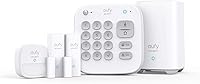
The 5-Piece Home Alarm Kit suits a small-home starter who wants entry and interior detection in one package. It includes a HomeBase, keypad, motion sensor and 2 entry sensors, with app alerts for motion or a breach.
A useful starting layout could put entry sensors on the front and back doors, then use the motion sensor in a shared interior area. That leaves other windows without individual opening detection, so decide whether that matches your actual coverage goal.
Entry sensors attach to doors and windows, while included mounts secure the keypad and motion sensor to walls. Plan keypad access around daily arrivals so household members can use it without walking deep into the home.
Choose this kit when its equipment mix covers your priorities without immediate additions. It gives you a clear starting point rather than a collection of accessories to assemble.
Skip it if your plan already requires several individually monitored openings. Compare the larger kit before committing to multiple separate sensor purchases.
eufy 7-Piece Essential Alarm System: Best for multiple entrances
- HomeBase Mini included
- Keypad and motion sensor
- Four entry sensors
- Compatible accessory expansion
Choose this kit when several doors or windows need their own sensors from the start. In-app setup guidance helps you place and connect the included equipment.
Pros
- More entry coverage out of the box
- Free app control
- Supports additional compatible accessories
Cons
- May still need extra sensors
- Camera compatibility varies by model
The 7-Piece Essential Alarm System suits homes with several entrances or a mix of doors and accessible windows. Its 4 entry sensors come with a keypad, motion sensor and HomeBase Mini, so broader entry coverage doesn't require choosing separate add-ons first.
HomeBase Mini includes 64 GB of local storage, and the system provides free app control and activity alerts. Storage capacity alone doesn't tell you which cameras work with it or how their recordings are handled.
Setup follows in-app guidance, starting with a plug-in HomeBase and sensor placement. eufy says the entry and motion sensor batteries last up to 5 years, while the USB-rechargeable keypad lasts about 6 months per charge.
Choose this kit when the extra entry coverage matches a written room-by-room plan. You can add compatible sensors and accessories later as your needs change.
Skip it if you only need one sensor for an existing setup. If cameras or a doorbell are central to your plan, confirm exact model compatibility and storage behavior before buying.
eufy Indoor Siren E20: Best for indoor alarm audibility
- Separate indoor audible alert
- App-adjustable volume
- Rechargeable backup battery
- Desk or wall placement
Add a separate audible alarm to a compatible eufy system. Flexible placement lets you position it where household members need to hear it.
Pros
- Adjustable alarm volume
- Backup power for the siren
- Adhesive and screw mounting options
Cons
- Requires a compatible US-version HomeBase
- Indoor use only
The Indoor Siren E20 suits a compatible system that needs a separate audible alert in another indoor location. Its 110 dB alarm has app-adjustable volume, allowing you to plan placement around where people spend time.
You can place it on a desk or attach it to a wall with the included adhesive strip or screws. Choose a position with space around it rather than hiding it behind furniture that can obstruct sound.
The siren normally plugs into power and automatically recharges its battery when power returns. eufy says the battery provides up to 48 hours of backup, with actual runtime depending on conditions.
That backup supports the siren itself. It doesn't establish that your HomeBase, router or remote notifications will continue during the same outage.
Choose it after checking whether people can hear your existing alarm from the rooms they use. Skip it if you still lack sensors or a compatible US-version HomeBase, or if you need an outdoor siren.
eufy HomeBase 3 Hub with 4 Entry Sensors: Best for HomeBase 3 builders
- HomeBase S380 hub
- Four entry sensors
- Built-in siren
- Expandable local storage
Build an entry-focused setup around HomeBase 3 without monthly fees. Choose it for that hub rather than expecting the equipment mix of a keypad-and-motion alarm kit.
Pros
- Hub and entry coverage together
- Supports connected-device responses
- Expandable storage
Cons
- No keypad or motion sensor included
- Hub and sensors may arrive separately
The HomeBase 3 bundle suits a buyer who specifically wants the S380 hub and entry-focused coverage. It pairs that hub with 4 entry sensors, but leaves out the keypad and motion sensor included in the alarm kits above.
HomeBase provides opening chimes and has a built-in 100 dB siren. With eufy app v6.0.00 or above, connected cameras or lights can also take part in automated responses.
The hub has 16 GB of built-in storage, expandable up to 16 TB with a separate portable hard drive. That capacity matters when planning compatible camera recording, but no cameras come in this bundle.
Choose it when HomeBase 3 is a deliberate part of your wider security plan. Don't buy extra storage just because the hub supports it; first work out what you'll record and retain.
Skip it if you want a keypad and motion detection from day one. The hub and sensors may arrive separately, so wait for all parts before setting aside installation time.
How these no-fee alarm picks differ
The main difference is what each purchase lets you build: a starter alarm, broader entry coverage or an addition to an existing system. FoyerFirst compared included equipment, compatibility, controls and expansion options while keeping each product's site-wide score unchanged.
A high score for a useful add-on doesn't make it a substitute for a complete kit. Start with the role you need, then compare the equipment within that role.
Both alarm kits combine entry detection, motion detection and a keypad. The HomeBase 3 bundle focuses on openings, while the separate sensor and siren fill individual gaps.
| Product | Best for | Role | Entry sensors | Hub | Our score |
|---|---|---|---|---|---|
| eufy Entry Sensor E20 | one extra doorway | Single entry sensor add-on | 1 | Required; not included | 8.5 |
| eufy 5-Piece Home Alarm Kit | small-home starters | Starter alarm kit | 2 | HomeBase included | 8.2 |
| eufy 7-Piece Essential Alarm System | multiple entrances | Alarm kit with broader entry coverage | 4 | HomeBase Mini included | 7.9 |
| eufy Indoor Siren E20 | indoor alarm audibility | Indoor siren add-on | None | Compatible US-version HomeBase required; not included | 7.5 |
| eufy HomeBase 3 Hub with 4 Entry Sensors | HomeBase 3 builders | Hub and entry sensor bundle | 4 | HomeBase S380 included | 6.5 |
How do you choose coverage without buying unnecessary sensors?
Choose coverage by opening and room, rather than by the number printed on a kit. A hub and keypad count as pieces even though neither detects an open window.
Draw a simple floor plan and mark exterior doors, reachable windows and routes through the home. Include the entrance you actually use each day, not just the formal front door.
Count openings before choosing a kit
Give each opening a priority based on access and household use. A frequently used exterior door and an easily reached window deserve a deliberate decision about coverage.
An entry sensor monitors the opening where it's installed. A motion sensor covers activity within its view, so it serves a different purpose rather than replacing every unmonitored door or window.
For example, covering 2 exterior doors and 2 accessible windows calls for 4 entry sensors. If you also want motion detection, compare a kit that includes it against a hub-and-entry bundle that needs more equipment.
Sliding doors, double doors and windows with multiple moving sections need extra thought. Work out which part moves and whether opening either section would separate the sensor from its magnet.
Match controls to everyone who lives there
Choose controls that household members can use consistently. A keypad can make daily arming and disarming simpler for people who don't want to manage every action through a phone.
Write down the normal routine for leaving, arriving and going to bed. Decide which openings must remain usable and make sure everyone understands when the alarm is armed.
A bypass button helps with a brief exit, but it shouldn't replace a clear household routine. People need to know when coverage is paused and when it resumes.
Choose a no-fee home security system you can manage
Self-monitoring fits best when someone can notice and act on alerts. Consider work shifts, travel and places where you regularly lose phone access.
Decide who takes responsibility when the main contact is unavailable. A backup person needs enough context to understand an alert and follow your agreed response plan.
Our guide to monthly security system fees explains which services can add recurring costs. For a wider equipment overview, see how to choose a home alarm kit.
What compatibility checks should you make before buying?
Confirm the exact HomeBase model, firmware and regional requirements before buying separate sensors or a siren. Sharing a brand name doesn't establish that two devices work together.
For the separate Entry Sensor E20, supported versions start at HomeBase Mini v4.0.5.2, HomeBase 3 v3.7.2.6 and HomeBase Pro v4.1.4.3. HomeBase 2 must be a unit released after 2021 running v3.4.1.2 or above.
The Indoor Siren E20 uses those same firmware requirements and needs a US-version HomeBase. Check the model information in your current setup rather than relying on how the hub looks.
Update supported equipment before pairing new devices. This avoids confusing an outdated software issue with a placement or wireless connection problem.
The E20 sensor and siren each support open-air distances up to 656 ft, according to eufy. Walls, floors and large obstacles change indoor conditions, so use the actual installation locations to judge whether the connection works.
Camera compatibility needs its own check, especially with HomeBase Mini. Confirm supported features and recording behavior for each camera instead of assuming hub storage applies to every model.
How should you set up sensors and daily controls?
Set up the hub first, pair devices nearby, then check each final location before mounting. This order makes it easier to separate connection issues from alignment problems.
Prepare and label each device
Name sensors by a location everyone understands, such as “Back door” or “Kitchen window.” Several devices called “Entry sensor” make an urgent notification harder to interpret.
Place the hub where its required power and connection are available. Avoid choosing a hidden location solely for appearance if it makes maintenance or access difficult.
Pair one device at a time and confirm its name before moving on. Keep the packaging until every included part is accounted for and connected.
Align entry sensors before securing them
Position the main sensor and magnet so they align when the opening is fully closed. Recessed trim and uneven frames can make two nearby parts sit at different depths.
Open and close the door or window normally, then confirm the status changes correctly. Check slow movement, a firm close and any other moving section that matters to your coverage plan.
Prepare mounting surfaces according to the supplied instructions. Dust, loose paint and unsuitable finishes can weaken an adhesive mount or make removal more damaging.
Don't force a fit that catches on blinds, curtains or the frame. A sensor that gets bumped during daily use will need repeated attention.
Place motion sensors around real movement
Position motion detection around the area you want to cover, following the instructions for the exact sensor supplied. Don't transfer mounting guidance from another model just because both use the same brand.
Consider pets, moving curtains, nearby heat sources and objects that may block the view. Check normal household activity before relying on the placement.
Avoid aiming through a room that everyone must cross while part of the home stays armed. Choose a daily routine that works with your layout rather than one that invites repeated false alarms.
Make arming and disarming routine
Walk each household member through an ordinary arrival and departure. Practice entering the code privately and confirm everyone knows how to silence an accidental alarm.
Keep access codes private and avoid sharing the main account password for convenience. Use a unique account password and review available account security options.
For renters, check the lease before drilling or attaching adhesive devices. Our guide to home alarm systems for renters covers installation choices worth resolving before move-in or move-out.
What happens during an internet or power outage?
Outage protection depends on every link needed for the function you expect. A powered sensor, a working local alarm and a remote phone notification are separate parts of that chain.
An entry sensor may use a battery while its hub needs plug-in power. Your internet equipment also needs power, and the connection beyond your home can fail independently.
Confirm which local functions remain available without internet and how the system reports a lost connection. The no-monthly-fee label doesn't answer either question.
A siren backup battery doesn't keep a router running. Likewise, backup power for internet equipment doesn't establish that the alarm has an alternate communication path.
If alerts during a broadband outage are essential, compare home security systems with cellular backup and check any service requirements. Choose that capability deliberately rather than assuming wireless sensors provide it.
Arrange outage checks when household members know what to expect and follow the device instructions. Restore normal power and connections afterward, then confirm that devices reconnect and show the correct status.
How do you keep a no-fee alarm useful over time?
Maintain power, alignment and alert access on a regular schedule. Long battery-life claims reduce replacement work, but they don't remove the need to check device status.
Review the app after installation and whenever you change phones, routers or account settings. Phone permissions and notification settings can change without a sensor moving at all.
Keep the app and hub software current, and review device battery levels. Add rechargeable controls to a household reminder so a low charge doesn't surprise you during an ordinary arrival.
Inspect adhesive mounts after seasonal changes and heavy use. Doors that slam, frames that shift and frequently cleaned surfaces can affect alignment or mounting.
Follow the supplied cleaning instructions and avoid soaking sensors or spraying cleaner into openings. Check alignment again after work on a door, window or frame.
Revisit coverage when routines change. A new pet, a room conversion or a different daily entrance can make an old motion-sensor position less useful.
Keep a short response plan that household members can find. Include who checks alerts, who acts as backup and how to respond safely when the cause is unclear.
Which buying and setup mistakes should you avoid?
The biggest mistakes are buying the wrong type of device and expecting services that aren't included. Resolve those gaps before adding convenience features.
- Buying an accessory as a starter system: A separate sensor or siren needs its compatible hub and the rest of your planned equipment.
- Counting pieces as covered openings: Use the entry-sensor count to map doors and windows.
- Buying storage before planning cameras: Decide what compatible devices will record before choosing extra capacity.
- Mounting everything immediately: Check pairing, alignment and daily use at the intended locations first.
- Treating app alerts as dispatch: Notifications still need a person who can assess and respond.
- Assuming battery power covers the whole system: Review the hub, siren, internet equipment and communication path separately.
Avoid expanding just to make every room appear covered on a diagram. Each device should have a clear job, a suitable location and someone responsible for maintaining it.
Which no-monthly-fee home security system should you choose?
Choose by what your home is missing, then buy the smallest setup that meets your coverage and response plan. A home security system with no monthly fee works best when its daily controls and self-monitoring duties fit your household.
Start with the 5-Piece Home Alarm Kit for a modest entry-and-motion plan. Choose the 7-Piece Essential Alarm System when more openings need individual coverage from the start.
Add the Entry Sensor E20 for one uncovered opening or the Indoor Siren E20 for another indoor audible alert. Pick the HomeBase 3 bundle when that hub is a deliberate part of your wider setup.
Before ordering, write down sensor locations, confirm compatibility and name the person who will handle alerts. Use our best DIY home security systems guide to compare complete kits against that plan.
Our top 3 picks at a glance
-
1
-
2
-
3
Frequently asked questions
Can a home security system work without a monthly fee?
Yes. The eufy alarm kits here provide app alerts without monthly fees for their included features.
You still need to check notifications and decide how to respond.
A no-fee system does not automatically include a monitoring center, emergency dispatch or backup connectivity.
Does no monthly fee mean the system is self-monitored?
Plan to handle alerts yourself with the setups covered here. A no-monthly-fee label does not establish that professional monitoring or emergency dispatch is included.
Our guide to self-monitored home security systems explains how to share response duties and prepare for times when you cannot check your phone.
Do no-fee alarm systems need internet?
Remote app alerts generally depend on a working connection, but local alarm behavior depends on the exact equipment and setup. Confirm both before relying on a system.
Sensor batteries, a siren backup battery and an internet backup serve different roles, so check each part of the alert path separately.
Can I add sensors to a no-monthly-fee alarm system?
Yes. The eufy 7-Piece Essential Alarm System supports additional compatible sensors and accessories, and separate E20 entry sensors work with supported HomeBase models.
Check the hub model, regional requirements and firmware before buying an add-on.
A shared brand name does not mean every device works together.
Is a no-monthly-fee system right for every home?
No. It suits households willing to manage equipment, check alerts and arrange their own response.
If work, travel or phone access makes that difficult, compare professional monitoring and its response terms.
Our guide to security system subscriptions explains the services that can justify a recurring charge.