How Much Is a Home Security System?
How much a home security system costs depends on the kit, extra sensors, installation, and service plan. Compare the full setup and recurring charges over the same period, rather than the starter kit alone.
On this page (8 sections)
- What determines how much a home security system costs?
- Does a home security system have a monthly fee?
- How can you estimate your total cost?
- Which home security systems fit different budgets?
- Is DIY installation cheaper than professional installation?
- How can you lower costs without leaving coverage gaps?
- What upkeep should you plan for?
- How much is a home security system for your home?
How much a home security system costs depends on equipment, installation, extra sensors, and any service plan. Some setups need only an upfront equipment payment, while others add recurring charges for the functions you want.
The useful comparison is the cost of covering your home, not the smallest box you can buy. Start with your entry points and decide who will respond to an alarm before choosing a kit.
What determines how much a home security system costs?
Your total comes from coverage and service choices. A starter kit is only a complete budget when it includes the sensors and functions you intend to use.
Count the doors and accessible windows you want monitored, then consider motion coverage inside. A motion sensor watches movement in an area; an entry sensor detects a particular door or window opening.
Separate these costs when comparing options:
- Equipment: the kit and any extra compatible sensors or accessories.
- Installation: your own setup time or a separate charge for help.
- Service: monitoring and features that depend on a paid plan.
- Upkeep: replacement batteries and any mounting supplies you need.
Piece counts can mislead because a keypad, base station, and range extender each count as equipment. Compare entry sensors directly instead of assuming a larger number means more protected doors.
For a broader starting point, our DIY home security system guide explains how to choose a kit around your home's layout.
Does a home security system have a monthly fee?
A home security system doesn't always require a monthly fee. Both eufy kits here provide app alerts without one, while Ring and SimpliSafe offer functions tied to paid services.
Separate self-monitoring from professional monitoring. With self-monitoring, you receive alerts and decide what action to take; professional monitoring adds a service that handles alarm signals under its plan terms.
Choose based on your availability, including work, sleep, and travel. Free notifications are useful only if someone can notice them and respond.
Compare home security systems with no monthly fee if recurring charges are your main concern. Our guide to home security systems without a subscription explains the feature tradeoffs.
How can you estimate your total cost?
Use the same ownership period and coverage plan for every kit. Comparing 1 system with no extras against another with monitoring and added sensors won't show which best meets your needs.
Write down the equipment total, installation charge, and recurring service separately. Multiply the monthly charge by the months you expect to use it, then add the other costs.
Make a second estimate without optional extras. This shows which spending is necessary for your coverage and which pays for convenience or a service you can add later.
Which home security system costs depend on a plan?
Remote features, backup connectivity, and monitoring can depend on subscriptions. Ring requires a compatible Ring Protect plan for remote arming, connectivity during a Wi-Fi outage, and professional monitoring.
SimpliSafe's monitored panic-button response requires professional monitoring. Don't assume that owning a button or sensor includes every service associated with it.
Before enrolling, check when billing starts, whether a trial converts to paid service, and how cancellation works. SimpliSafe offers optional monitoring without a long-term contract, but you should still understand the plan you select.
Our guide on how to choose a home security kit helps turn your coverage list into an equipment plan. Use DIY vs professional alarm installation when weighing installation help.
Which home security systems fit different budgets?
Choose by included coverage and how you want alarms handled. These kits serve different needs, so none is automatically the lowest-cost choice for every home.
SimpliSafe: for several entry points and optional monitoring
Choose SimpliSafe if you want optional professional monitoring alongside a keypad and several entry sensors. The panic button also suits someone who wants a dedicated way to request help through the monitored service.
Setup uses a plug-in base station, the SimpliSafe app, and placed sensors, with no wiring or drilling required. Entry sensors can also send quiet Secret Alerts for private areas instead of sounding an alarm.
Skip this kit if your priority is a simple self-monitored setup with fewer accessories. SimpliSafe products and professional monitoring are offered and supported in the US, so it isn't a suitable choice for a home elsewhere.
Ring Alarm: for a small starting setup you can expand
Choose Ring if 1 contact sensor covers your starting plan and you want the option to add sensors later. Its keypad gives household members a direct way to arm and disarm the alarm.
The included range extender counts toward the kit's piece total but doesn't monitor another opening. Add the cost of extra contact sensors before comparing it with bundles that already cover several doors.
Skip this starter kit if you need multiple entry sensors immediately and haven't budgeted for extras. Also choose another approach if subscription-free remote arming is essential, since that Ring function requires a compatible plan.
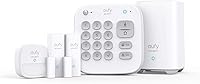
eufy 5-Piece: for a small self-monitored home
Choose this eufy kit if 2 entry sensors match your coverage plan and you intend to handle alerts yourself. Its HomeBase and keypad support a compact setup without a recurring fee for app alerts.
The entry sensors attach to doors and windows, while included mounts let you secure the motion sensor and keypad to walls. Plan those positions before attaching anything so controls stay within easy reach.
Skip it if several more openings need individual sensors from day 1. Don't choose it on the assumption that app notifications include a professional response service.
eufy 7-Piece Essential: for more entry coverage without monthly fees
Choose the Essential kit if you want 4 entry sensors with free app control and alerts. It includes a keypad and HomeBase Mini, and supports additional compatible sensors and accessories.
Eufy says its entry and motion sensor batteries last up to 5 years, while the USB-rechargeable keypad lasts about 6 months per charge. Treat those as planning estimates and respond to battery warnings as they appear.
Skip it if you need someone else to handle alarms and haven't arranged that response. If you want to connect existing eufy cameras or a doorbell, confirm model compatibility first because HomeBase Mini supports selected devices.
Is DIY installation cheaper than professional installation?
DIY installation can avoid a separate installer charge, and all 4 kits support self-installation. Your time still matters, especially if you need help placing sensors or connecting equipment.
Before mounting, follow the kit's instructions and check that each sensor communicates from its intended position. Confirm that opening a monitored door or walking through the motion area produces the expected indication or alert.
Clean and dry surfaces before using adhesive mounts, following the mounting instructions. Check alignment and clearance with doors and windows both open and closed.
For motion sensors, follow the guidance for the exact model rather than borrowing placement advice from another kit. Arrange installation help if reaching suitable locations or completing setup would be difficult.
How can you lower costs without leaving coverage gaps?
Spend first on the openings and response plan that matter to your household. Add convenience features after you have a workable basic setup.
Mark your planned sensors on a simple floor sketch. Distinguish doors and windows that need individual alerts from rooms where motion coverage serves a different purpose.
Avoid these common buying mistakes:
- Comparing kit piece counts instead of actual entry coverage.
- Assuming app alerts include professional monitoring.
- Buying extra sensors before confirming compatibility.
- Paying for a plan without identifying the feature you need.
- Assuming an alarm kit includes cameras when none are included.
Our guide to door and window alarm sensors can help you plan individual openings. For ongoing service choices, compare self-monitored home security systems and how much SimpliSafe costs per month.
What upkeep should you plan for?
Plan for battery care, secure mounts, and usable notifications. A system needs attention after installation, even when it has no monthly fee.
Follow battery warnings, recharge keypads as needed, and check that sensors remain firmly attached and aligned. Revisit motion coverage after moving furniture or changing how you use a room.
Keep app notifications enabled and teach household members how to arm and disarm the system. Follow the manufacturer's check procedure after moving equipment so placement changes don't leave unnoticed gaps.
How much is a home security system for your home?
Choose the smallest complete setup that covers your plan, then add only the service you want. How much a home security system costs becomes clearer once you compare equal coverage over an equal period.
Pick the eufy 5-Piece kit for 2 entry points with self-monitoring, or the eufy Essential kit for 4 with free app control. Choose SimpliSafe for its broader included equipment and optional monitoring, or Ring for a smaller expandable start with plan-dependent remote features.
Before ordering, write down what you'll pay upfront, what recurs, and who will respond to alerts. Compare the monthly fees for home security systems to settle that final service choice.
Frequently asked questions
How much does a home security system cost per month?
A home security system can have no monthly fee when its included features support self-monitoring without a plan. Both eufy kits here offer that approach, while professional monitoring and certain remote features can require recurring payments on other systems; compare the exact features you need before choosing.
Is a home security system worth the monthly fee?
A monthly fee can be worthwhile if you want a monitoring service to handle alarm signals when you can't respond; it can also pay for features such as backup connectivity, depending on the system. Decide which service you need first, then compare its ongoing commitment with your daily routine.
Can I use a home security system without a subscription?
Yes, both eufy kits here provide app alerts without monthly fees, and the Essential kit also includes free app control; other systems reserve some functions for subscribers. Check remote arming, backup connectivity, and professional monitoring separately so you understand what remains available without paying for a plan.
What should I include when comparing home security system costs?
Include the starter kit, extra sensors, installation help, recurring service, and routine upkeep such as replacement batteries. Use the same ownership period for every option, and check cancellation terms; a kit that needs several add-ons may be a poorer fit than one that covers your planned entry points immediately.