DIY vs Professional Home Alarm Installation: Which Is Better? (October 2026)
For home security system installation cost vs DIY, DIY usually saves on labor. Pay for professional installation when wiring, difficult mounting or setup help makes the service worth its cost.
On this page (9 sections)
- Home security system installation cost vs DIY: what should you count?
- What should professional installation include?
- Which DIY kit fits the work you want to avoid?
- How do you install a DIY alarm without wasting time?
- Does DIY installation change monthly monitoring fees?
- When is paying an installer worth it?
- What mistakes create extra work or weak coverage?
- Which installation choice should you make?
- FAQ
DIY usually wins on home security system installation cost vs DIY comparisons because you avoid paying installation labor. Professional installation earns its place when the job involves wiring, awkward mounting or setup work you don't want to handle.
Compare complete setups, not just the first charge. A small kit that leaves several entry points uncovered isn't equivalent to a professional quote that includes those sensors.
Installation and monitoring are separate choices. You can install a compatible alarm yourself and still subscribe to professional monitoring.

Home security system installation cost vs DIY: what should you count?
Count equipment, setup work and ongoing service over the same period. Comparing a DIY kit with a bundled professional offer only works when both cover the same doors, windows and services.
Start with the equipment you actually need. Count each door or window you want to monitor separately, then identify rooms where motion detection would add useful coverage.
Next, separate one-time charges from recurring charges. Labor, activation, mounting supplies and extra setup visits belong beside the equipment total; monitoring and required service plans belong in the ongoing budget.
Use this comparison:
| Cost or commitment | DIY option | Professional option |
|---|---|---|
| Equipment | Kit plus needed extras | All devices in the quote |
| Installation | Supplies, tools and your time | Labor and any additional work |
| Service | Plans needed for chosen features | Required or optional service |
| Future changes | Moving or adding devices yourself | Visit fees and expansion terms |
| Leaving the service | Cancellation and equipment terms | Contract and ownership terms |
For a chosen period, add the upfront total to all required service payments during that period. If you compare 3 years of ownership, use 36 monthly payments for both options.
Your time matters even when it doesn't appear on an invoice. Include planning, setup, sensor checks and teaching everyone at home how to use the alarm.
The DIY home alarm system guide helps you choose a kit. For the wider budget, see how much a home security system costs.
What should professional installation include?
Professional installation should deliver a working setup and a clear handover. The written scope should identify the devices, their locations and the work the technician will complete.
Ask whether the visit covers mounting sensors, configuring the base station, connecting devices and checking alerts. Include user instruction, account access and a review of entry and exit settings in that conversation.
Check who handles difficult surfaces, cable routing or existing wired equipment. Don't assume a basic installation charge includes every job needed in your home.
If you already have wired sensors, ask whether the proposed system can use them before paying for replacements. Our wired vs wireless alarm systems guide explains the practical differences.
Ask what happens if a sensor loses contact or comes loose after the visit. Get the follow-up period, covered work and any return-visit charge in writing.
Finally, confirm equipment ownership and account control. You should understand what remains usable if you stop the service or move.
Which DIY kit fits the work you want to avoid?
Choose Ring for expansion, SimpliSafe for no-drill placement, or eufy for a small self-monitored setup. Their different coverage and service options matter more than the number of pieces printed on the box.
These are wireless alarm kits, so compare them with a quote for similar alarm coverage. Cameras, new wiring and other added work would change the scope.
Ring: for several entry points and room to expand
Ring suits a household that wants to start with several protected openings and add compatible Alarm Sensors later. Ring positions this kit for 1–2 bedroom homes, but your actual door and window count matters more than bedroom count.
The kit includes a base station, keypad, 4 contact sensors, a motion detector and a range extender. Mobile notifications arrive through the Ring app when the system is triggered.
Choose it if you want to expand coverage without replacing the whole starter kit. Plan the initial sensor locations first so extra accessories solve a clear coverage need.
Skip it if your budget assumes remote arming and backup connectivity come without a subscription. Those features require a compatible Ring Protect Plan, so include the plan in your comparison before choosing Ring.
SimpliSafe: for no-drill placement and flexible keypad positioning
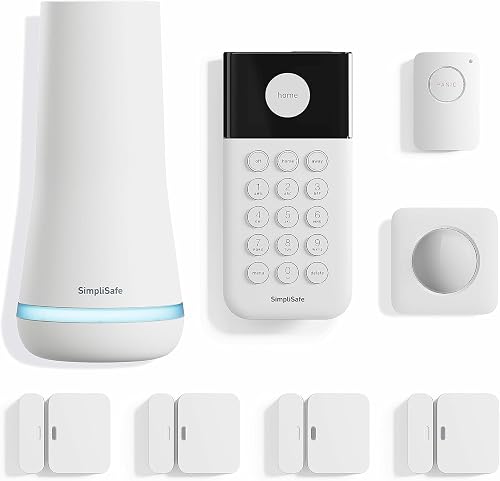
SimpliSafe suits renters and homeowners who want to place sensors without wiring or drilling. Setup involves plugging in the base station, downloading the app and placing the devices.
Its bundle contains a base station, wireless keypad, 4 entry sensors, a motion sensor and a panic button. The keypad needs no plug, which gives you more freedom to put it near your usual entrance.
Choose it if you want optional professional monitoring without a long-term contract. SimpliSafe also offers installation help directly, so you can ask about assistance if self-setup becomes difficult.
Skip it if you need sales and support outside the US. Also, don't choose it expecting the panic button to dispatch help without a professional monitoring subscription.
eufy: for a small coverage plan and app alerts
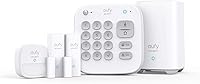
Eufy suits someone covering a small number of openings who intends to respond to alerts personally. It includes a HomeBase, keypad, motion sensor and 2 entry sensors, with no monthly fees.
The entry sensors attach with adhesive, while the motion sensor and keypad use included mounts. Check the mounting instructions against your surfaces before deciding where everything will go.
Choose it when those entry sensors match a deliberate coverage plan and you can respond to app notifications. Keep phone notification permissions enabled and decide who will act if you miss an alert.
Skip this starter bundle if you need many openings covered immediately. Its app alerts also aren't a basis for assuming professional monitoring or emergency dispatch is included.
How do you install a DIY alarm without wasting time?
Plan locations before attaching equipment. A careful walk through your home can prevent moving sensors, replacing adhesive and repeating setup steps.
Start with the entrances you use and the accessible openings you want covered. Don't assume one motion sensor replaces individual entry sensors, since each detects a different event.
DIY home security installation costs: avoid paying twice
Read the mounting instructions before buying extra supplies or making holes. Check sensor alignment, allowed gaps and the surfaces each attachment method supports.
Follow this order:
- Map the openings and rooms you want covered.
- Read the full setup sequence and gather the required supplies.
- Label sensors by location as you add them.
- Check communication at each intended position before final mounting, where the instructions allow.
- Attach devices and follow the system's sensor-check procedure.
- Confirm alerts and show household members how to arm and disarm.
Place motion sensors according to their own guidance rather than aiming them wherever a wall is empty. Consider pets, moving curtains and the room's normal activity when selecting a location.
If monitoring is active, follow the provider's procedure for checking alarm operation without an unnecessary emergency response. Make sure any required account contacts are correct before relying on the system.
Allow an unhurried setup session rather than assuming every kit takes the same time. Downloading apps, creating accounts and correcting placement can take longer than attaching the hardware.
Renters should check lease terms before mounting anything. Our alarm system for apartments guide covers placement around your unit and shared spaces.
Does DIY installation change monthly monitoring fees?
DIY doesn't automatically mean self-monitoring. Installation describes who sets up the equipment; monitoring describes who handles alarm events afterward.
Ring and SimpliSafe offer optional professional monitoring for these kits. Compare what each service includes rather than assuming every paid plan provides the same features.
A household with someone available to handle notifications may prefer self-monitoring. If everyone is often unreachable, consider how alerts would be handled during work, travel or sleep.
Ask about backup connectivity separately from installation. A technician's visit doesn't itself provide a backup connection, and an app notification doesn't establish that an emergency responder will be contacted.
Our guide to home security systems without a subscription explains the service tradeoffs. Read about self-monitored home security systems if you plan to manage alerts yourself.
When is paying an installer worth it?
Pay an installer when the work exceeds your time, tools or comfort level. Wiring, difficult access and a large number of devices can make professional help worthwhile.
Professional help also suits someone who needs a guided handover. Ask for a demonstration that every regular user can follow, rather than accepting a quick explanation at the door.
DIY is a better fit when you can follow the mounting instructions, use the app and check each device. Paying for basic placement may add little value if those tasks are already comfortable for you.
A mixed approach can work, too: choose suitable equipment, then ask about paid setup help. Confirm that the installer supports the exact kit and that buying installation doesn't create an unwanted service commitment.
If you're unsure which tasks a kit requires, use how to choose a DIY home security system to narrow the options before requesting quotes.
What mistakes create extra work or weak coverage?
The biggest mistakes are buying too little coverage and skipping setup checks. Piece counts alone can mislead because keypads and base stations don't protect separate openings.
Avoid these common errors:
- Comparing different scopes. Match the same entry points, rooms and service features.
- Mounting everything first. Check positions and communication before final attachment where possible.
- Ignoring daily habits. Put controls where people can use them during normal entry and exit.
- Treating adhesive as mark-free. Check surface suitability and removal guidance.
- Skipping notification settings. Confirm the right phone receives alerts and that someone will respond.
- Forgetting future moves. Compare removal, relocation and service terms before signing.
Keep the system useful after installation. Follow its maintenance guidance, respond to low-battery notices and check that sensors remain secure and aligned after doors or windows receive repairs.
Review device names and user access when household routines change. Clear labels help you tell which opening caused an alert without guessing.
Which installation choice should you make?
For home security system installation cost vs DIY, choose based on the work your home needs and the service you will actually use. A clear coverage plan makes that decision easier.
Pick Ring if you want room to add compatible sensors and accept the plan requirements for your chosen features. Pick SimpliSafe if no-drill placement and optional monitoring without a long-term contract fit your household.
Pick eufy if a small, app-based setup matches your coverage plan. Get a professional quote if wiring, mounting or configuration would otherwise leave the installation unfinished.
Before committing, match the devices and services line by line, then review monthly home security fees to check the ongoing commitment.
FAQ
Labor savings depend on the full setup. These answers cover the main costs and service choices to settle before buying.
Is DIY home alarm installation cheaper?
DIY usually costs less to install because you avoid paying someone to place and configure the equipment. Compare equal coverage, though: extra sensors, mounting supplies and required service plans can change the total.
Ask for an itemized professional quote and compare both options over the same period.
Do DIY alarm systems require drilling?
Some DIY alarm systems need no drilling. SimpliSafe's 8-piece system requires no wiring or drilling, while eufy's kit uses adhesive entry sensors and included mounts for the motion sensor and keypad.
Follow each component's instructions, and check whether your lease allows attachments that might leave marks.
Can you install an alarm system and still get professional monitoring?
Yes, DIY installation can be paired with professional monitoring when the system supports it. Ring and SimpliSafe offer optional monitoring for these kits.
Installation covers getting the equipment ready; monitoring covers how alerts are handled afterward, so compare the service terms separately from any setup charge.
What should a professional alarm installation quote include?
A useful quote separates equipment, labor, activation, recurring service and any extra work. It should also explain equipment ownership, the contract term and cancellation rules.
Ask whether sensor checks, user training and a follow-up visit are included, and get any promised work recorded in writing before agreeing.
Should renters choose DIY alarm installation?
DIY often suits renters who want control over placement and moving their equipment later. Confirm that the mounting method meets your lease terms, since adhesive attachments can still leave marks.
Our alarm systems for apartments guide helps you plan coverage around your own unit and shared building spaces.
Frequently asked questions
Is DIY home alarm installation cheaper?
DIY usually costs less to install because you avoid paying someone to place and configure the equipment. Compare equal coverage, though: extra sensors, mounting supplies and required service plans can change the total.
Ask for an itemized professional quote and compare both options over the same period.
Do DIY alarm systems require drilling?
Some DIY alarm systems need no drilling. SimpliSafe's 8-piece system requires no wiring or drilling, while eufy's kit uses adhesive entry sensors and included mounts for the motion sensor and keypad.
Follow each component's instructions, and check whether your lease allows attachments that might leave marks.
Can you install an alarm system and still get professional monitoring?
Yes, DIY installation can be paired with professional monitoring when the system supports it. Ring and SimpliSafe offer optional monitoring for these kits.
Installation covers getting the equipment ready; monitoring covers how alerts are handled afterward, so compare the service terms separately from any setup charge.
What should a professional alarm installation quote include?
A useful quote separates equipment, labor, activation, recurring service and any extra work. It should also explain equipment ownership, the contract term and cancellation rules.
Ask whether sensor checks, user training and a follow-up visit are included, and get any promised work recorded in writing before agreeing.
Should renters choose DIY alarm installation?
DIY often suits renters who want control over placement and moving their equipment later. Confirm that the mounting method meets your lease terms, since adhesive attachments can still leave marks.
Our alarm systems for apartments guide helps you plan coverage around your own unit and shared building spaces.