Wired vs Wireless Alarm Systems: Which Fits Your Home? (October 2026)
For wired vs wireless alarm systems, choose wireless for a fresh DIY setup or consider a retrofit kit to reuse functional wired contact sensor zones. Check coverage, installation work, and backup services before choosing.
On this page (10 sections)
- Wired vs wireless alarm systems: which should you choose?
- Which of these three products fits your situation?
- How should you plan sensor coverage before buying?
- How does installation differ in an occupied home?
- What happens if Wi-Fi or power goes out?
- What do monitoring and monthly fees change?
- Is a wired alarm more reliable than a wireless one?
- What care and daily habits keep an alarm useful?
- Which common buying mistakes should you avoid?
- Which alarm system should you choose now?
Choose wireless for a fresh DIY installation and consider a retrofit when you already have working wired contact sensor zones. For wired vs wireless alarm systems, the best choice starts with your home's entry points, existing equipment, and the work you're prepared to arrange.
Ring Alarm and SimpliSafe offer wireless starter kits here. Ring Retrofit serves a different buyer: someone who wants to bring compatible existing wired contact zones into a Ring Alarm system.
These options aren't three interchangeable bundles. The two wireless kits provide starting equipment; the retrofit kit needs both suitable existing zones and a separate alarm system.

Wired vs wireless alarm systems: which should you choose?
Choose wireless if you need new coverage without running sensor wires. Consider wired equipment or a retrofit if useful wiring is already in place, especially when replacing those sensors would mean unnecessary work.
A wired alarm connects sensors to control equipment through physical wiring. A wireless alarm sends sensor signals without those wires, although its base station may still need a power outlet and network connection.
A hybrid setup combines approaches. Reusing wired contact zones through a compatible adapter lets those zones become part of another alarm system without turning every existing sensor into a wireless device.
Wired vs wireless alarms: three starting situations
- An apartment with no alarm equipment: Start with a wireless kit and check mounting rules before choosing sensor locations.
- A house with an old alarm panel: Have the existing zones assessed before deciding whether to reuse or replace them.
- A home being built or renovated: Compare wiring work while walls are accessible with the future maintenance and placement needs of wireless sensors.
Don't choose solely by bedroom count. A small home with several accessible windows may need more contact sensors than a larger home with fewer entry points.
If the roles of sensors, keypads, and base stations are unclear, read how a home security system works before comparing bundles.
Which of these three products fits your situation?
Ring suits a smaller-home starter setup, SimpliSafe suits a no-drilling installation, and Ring Retrofit suits usable wired contact zones. Choose the installation route first, then decide which equipment meets your coverage and control needs.
Ring Alarm 8-Piece Kit: for a smaller home starting fresh
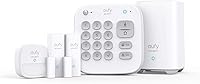
The Ring kit includes a base station, keypad, four contact sensors, one motion detector, and a range extender. Ring describes it as a fit for 1–2 bedroom homes.
Choose it if your initial plan calls for several protected doors or windows plus motion coverage in an indoor area. The Ring app provides mobile notifications when the system is triggered and lets you monitor your Ring devices together.
Ring also allows additional Alarm Sensors and accessories, sold separately. That makes this a useful starting point if you want to cover the main entry routes now and expand later.
Skip this bundle if your coverage plan needs substantially more sensors from the start and another kit better matches that count. Include any extra components in your comparison rather than assuming the starter bundle finishes the job.
Also separate app alerts from remote control. Remote arming, continued connectivity during a Wi-Fi outage, and professional monitoring require a compatible Ring plan.
SimpliSafe 8-Piece Wireless System: for installation without drilling
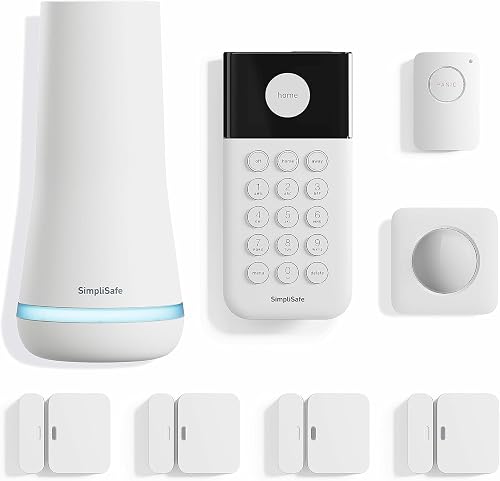
SimpliSafe includes a base station, wireless keypad, four entry sensors, a motion sensor, and a panic button. Setup requires plugging in the base station, downloading the app, and placing the sensors, with no wiring or drilling required.
Choose it if avoiding alterations is a priority and you want a keypad that doesn't need its own plug. It also suits households that want a direct alarm trigger in addition to entry and motion detection.
The entry sensors can protect doors, windows, or cabinets. Secret Alerts can quietly notify you about access to private areas, which serves a different purpose from sounding a household alarm.
Skip it if you need supported service outside the US. SimpliSafe products and professional monitoring are sold and supported only in the US.
Don't choose it solely because the motion sensor accommodates some pets. SimpliSafe describes support for pets under 60 lb, but placement and animal movement still deserve attention.
Ring Retrofit Alarm Kit: for keeping working wired contact zones
Ring Retrofit connects compatible functional wired contact sensor zones to Ring Alarm. It requires a separate Ring Alarm system and isn't a replacement starter kit.
Choose it if you already have useful door or window contact zones and want to manage them through Ring. Connected zones can provide mobile notifications and work as part of the alarm managed in the Ring app.
Skip it if you have no existing wired zones, if those zones don't work, or if you don't want Ring Alarm. Buying an adapter first won't solve damaged wiring or an unsuitable existing installation.
Ring recommends an experienced security system installer or licensed electrician. Ask that person to identify the zones, check their condition, and confirm compatibility before ordering equipment.
How should you plan sensor coverage before buying?
Count the openings you want protected before counting kit pieces. A base station, keypad, extender, and panic button each serve a purpose, but none replaces a contact sensor on an entry point.
Draw a simple floor plan and mark exterior doors, accessible windows, and routes through the home. Decide which openings need their own contact sensor and where motion coverage would add useful detection.
A contact sensor detects a door or window opening. A motion sensor covers movement within its detection area, so these components answer different needs.
Use this short checklist:
- Count individual doors and windows that need coverage.
- Check whether nearby openings can each accept a sensor in the required position.
- Identify an indoor area where motion detection would help.
- Mark a convenient keypad location along your normal entry route.
- Check whether the kit leaves any planned opening uncovered.
For older wired systems, ask how sensors are grouped into zones. Several openings may share a zone, so establish what each zone covers and how clearly you can identify an event.
Our guide to door and window alarm sensors explains where dedicated contact coverage can help. Use it to settle the coverage plan before adding accessories.
How does installation differ in an occupied home?
Wireless installation avoids new sensor cable runs; wired work depends on access to the cable routes. Existing wiring can reduce the work, while concealed faults or missing zone labels can make reuse harder.
For a wireless setup, start with placement before attaching anything permanently. Follow the manufacturer's instructions for sensor alignment, allowed gaps, mounting surfaces, and communication checks.
Opening and closing a door shouldn't shift the sensor or pull its parts out of alignment. Check that locks, handles, blinds, and window movement won't interfere with the chosen position.
Place the base station according to the system's instructions, then check communication from every intended sensor location. Don't assume that a signal reaching one room will reach a detached area or the far side of several walls.
A wired retrofit calls for a different first step: identifying what is already connected. Leave unfamiliar panel connections and electrical work to a qualified installer rather than disconnecting wires to see what happens.
Compare the work involved in DIY vs professional home alarm installation. For a broader kit checklist, use how to choose a DIY home security system.
Renters should check lease terms before mounting equipment or changing an existing alarm. Our alarm systems for renters guide focuses on that situation.
What happens if Wi-Fi or power goes out?
Power backup and communication backup solve different problems. A battery can keep equipment powered, while an alternate network path helps it communicate when the usual connection fails.
Wireless sensor communication isn't the same as Wi-Fi. Likewise, a wired contact sensor doesn't establish whether the control equipment can send alerts during an internet outage.
Ring offers continued connectivity when Wi-Fi goes down through a compatible plan. Don't assume that benefit is included simply because the kit contains a base station.
SimpliSafe says its base station battery lasts up to 24 hours. Its network backup during a power outage requires a professional monitoring plan.
Before choosing, separate these questions:
- Which components remain powered during an outage?
- Can the system still detect an event and sound a local alarm?
- Can it send an alert outside the home?
- Which backup functions require a paid plan?
A router also needs power to keep operating. A working alarm battery alone doesn't prove your home network will remain available.
If communication during an outage is a priority, compare home security systems with cellular backup. Check the service conditions alongside the equipment.
What do monitoring and monthly fees change?
Monitoring determines who handles an alert; wiring determines how sensors connect. Choose these separately so an easy installation doesn't distract you from the response you want.
With self-monitoring, plan who will notice alerts and what they should do next. Phone notification settings, missed messages, and times when you're unavailable all affect that plan.
Professional monitoring adds agents who can contact emergency responders under the service's procedures. Ring offers optional monitoring for police, fire, and medical response; SimpliSafe also offers optional professional monitoring without a long-term contract.
For SimpliSafe's panic button, police dispatch requires a professional monitoring subscription. Make sure everyone understands the difference between triggering an alarm and having a service handle the event.
Read what a home alarm system subscription includes before committing to a plan. If you want to handle alerts yourself, see how self-monitored home security systems work.
Is a wired alarm more reliable than a wireless one?
Neither connection type guarantees a more reliable whole system. Installation quality, component condition, power, communication, and upkeep all affect whether the alarm works as intended.
Wired sensors avoid individual wireless signal paths, but old cables and loose connections can cause trouble. Reusing existing wiring makes sense only after confirming that it works.
Wireless sensors allow placement without cable routes, but you need to follow battery and communication guidance. Changes in room layout or equipment placement may call for another communication check.
Treat faults as a reason to investigate. Repeated alerts from one opening may point to alignment, mounting, wiring, or component issues rather than a reason to disable that sensor permanently.
What care and daily habits keep an alarm useful?
Keep sensors secure, respond to trouble alerts, and make arming part of your routine. Equipment that is installed correctly still needs attention as doors, batteries, and household habits change.
Check sensor mounts for movement, especially on frequently used doors. When cleaning around sensors, avoid knocking them out of alignment or getting moisture into the equipment.
Follow the manufacturer's battery replacement instructions and respond promptly to low-battery messages. Don't assume every component uses the same battery or replacement schedule.
Review keypad access with everyone who needs it. Agree on who arms the system, how people enter during an entry delay, and whom to contact if an unexpected alarm occurs.
Before running any alarm checks, follow the system's instructions and the monitoring provider's procedure. This helps avoid an unintended request for emergency response.
Revisit coverage after changing a door, replacing windows, renovating, or moving large furniture near a motion sensor. A useful maintenance habit is checking the alarm whenever the protected area changes.
Which common buying mistakes should you avoid?
Avoid comparing piece counts without checking coverage and required services. A larger bundle can still leave the wrong openings unprotected or lack the backup function you expect.
- Buying a retrofit kit as a complete alarm: Ring Retrofit needs compatible working zones and a separate Ring Alarm system.
- Assuming old equipment is reusable: Have its condition and compatibility checked before building your plan around it.
- Treating a motion sensor as full perimeter coverage: It detects movement in its field, while contact sensors identify openings.
- Choosing by setup alone: Compare ongoing battery care, service plans, and who will handle alerts.
- Ignoring household routines: Plan for pets, late arrivals, visitors, and anyone who may struggle with app controls.
- Expecting every feature without a plan: Confirm remote control, backup communication, and dispatch requirements separately.
Write down the exact result you want before choosing equipment. “Notify me when the back door opens” is a clearer requirement than “make the house smart.”
Which alarm system should you choose now?
Choose Ring Alarm for a smaller-home wireless start, SimpliSafe for a no-drilling setup with a panic button, or Ring Retrofit for confirmed working wired contact zones. Each fits a different starting point.
If your home has an old alarm, arrange the zone assessment first. If you're starting from nothing, finish the entry-point count and placement plan before selecting a bundle.
For wired vs wireless alarm systems, the deciding question is how to get the coverage you need with manageable installation and upkeep. Once you've chosen the wireless route, compare the best wireless alarm systems for home against your finished coverage plan.
Frequently asked questions
Are wired or wireless alarm systems better?
Wireless systems are usually the better starting point when you want to avoid running sensor wires; existing functional wired contact sensor zones can make a retrofit worth considering. Choose by coverage, installation work, maintenance, and backup needs rather than assuming either connection type makes the whole system more reliable.
Can you use existing wired sensors with a wireless alarm?
Yes, compatible functional wired contact sensor zones can connect to Ring Alarm through the Ring Retrofit Alarm Kit; it requires a separate Ring Alarm system. Ring recommends an experienced security system installer or licensed electrician, so confirm the condition and compatibility of your zones before buying the equipment.
Is a wireless alarm easier to install?
Wireless alarms generally reduce installation work because you don't need to run new wires to each sensor; SimpliSafe's kit requires no wiring or drilling. You still need to choose suitable positions, follow mounting instructions, check communication from each location, and make sure everyone knows how to arm and disarm it.
Do wireless alarm systems need Wi-Fi?
Wireless sensor communication and home internet are separate parts of an alarm system; a wireless label doesn't establish which functions need Wi-Fi or a service plan. Ring offers continued connectivity during a Wi-Fi outage through a compatible plan; check local alarm operation, app access, and backup communication separately.
Can renters use a wireless alarm system?
Yes, a wireless kit can suit renters who want to avoid new wiring; SimpliSafe supports setup without wiring or drilling, but you should still check your lease and mounting instructions. Plan how to remove mounts without damage, and compare coverage options in our guide to alarm systems for apartments.