9 Best DIY Home Security Systems With Custom Alerts (November 2026)
The best DIY home security systems with custom alerts include the tolviviov 15-Piece WiFi Home Security System for free app alerts on a budget, the Ring Alarm 8-Piece Kit (2nd Gen) for optional professional monitoring, and the Ring Alarm 14-Piece Kit for larger homes.
On this page (8 sections)
- The best DIY home security systems with custom alerts for each home
- How the DIY home security kits compare on alerts and coverage
- How these DIY home security systems were compared
- What should you look for in custom alerts?
- Which connectivity fits your home?
- How much should you plan to expand?
- Do you need professional monitoring?
- Which custom alert kit is right for you?
The best DIY home security system with custom alerts for most homes is the tolviviov 15-Piece kit, because its free app sends real-time phone alerts and its 120 dB siren covers a typical house without a monthly fee. For optional 24/7 monitoring, Ring is the better fit.
If your Wi-Fi drops often, choose D1D9 for its 4G backup.
The thing that separates a good kit from a frustrating one is not the sensor count. It is how the alerts reach you, and whether you can tailor them to your routine.
A system that pings you for every motion event at 7 a.m. gets ignored within a week.
That is why this guide focuses on the alert side of each kit. Every system here sends phone notifications.
The differences sit in how you customize them, whether they survive a Wi-Fi outage and what they cost after the box arrives.
If you want the wider picture first, our guide to choosing a DIY home security system walks through sensors, hubs and monitoring. For camera coverage too, see the best DIY home security systems with cameras.
Our picks at a glance
-
1
 Best for free app alerts on a budget
tolviviov 15-Piece WiFi Home Security System
9.2/10 our score
See it on Amazon -
2
 Best for optional professional monitoring
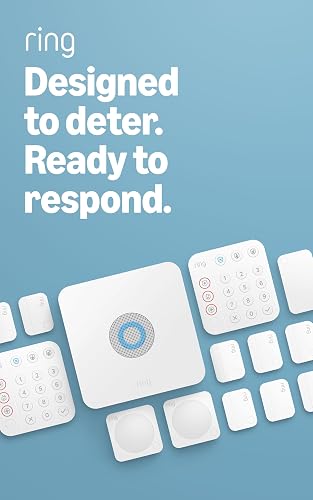
Ring Alarm 8-Piece Kit (2nd Gen)
9.1/10 our score
See it on Amazon -
3
- 4
 Check it
SimpliSafe 8-Piece Wireless System
Best for renters who want no contract - 5
 Check it
X-Sense Smart Home Security System
Best for apartment-sized coverage - 6
 Check it
D1D9 24pcs Wireless DIY Home Burglar Alarm
Best for Wi-Fi backup with 4G - 7
 Check it
YISEELE Home Security System Wireless
Best for voice control with Alexa and Google - 8
 Check it
TUGARD Alarm System with Phone APP Alert
Best for custom alert calls and texts - 9
 Check it
Hapippofa GEN 2 Wireless Home Security System
Best for touchscreen control
The best DIY home security systems with custom alerts for each home
tolviviov is the strongest all-round pick for free, app-based alerts. The rest of the list fills in specific gaps: a monitoring plan, a small rental, cellular backup or voice control.
Choose by the alerts you need before you compare sensor counts.
tolviviov 15-Piece WiFi Home Security System: Best for free app alerts on a budget
- 15 pieces
- 120 dB siren
- Alexa compatible
- no monthly fee
A 15-piece kit that sends real-time phone alerts through a free app. The 120 dB siren and 10 door sensors cover a typical house without a subscription.
Pros
- No monthly fee
- 10 door sensors
- Alexa voice control
Cons
- 2.4GHz Wi-Fi only
- No motion zone tuning
tolviviov suits a house or apartment where you want phone alerts without a subscription. Its app sends real-time pushes when a sensor trips, so a door opening while you are out shows up on your phone within seconds.
The 120 dB siren is the deterrent part. Ten door sensors and one motion sensor cover the main entry points of a typical home.
The base station pairs with Alexa, so voice commands can arm or check the system.
Customization runs through the app: you set the alert behavior and expand the kit with up to 20 sensors and 5 remotes or keypads. A keypad and two remotes are in the box, so family members can arm without the app.
One thing to plan for is the network. It connects on 2.4GHz Wi-Fi only, so a 5GHz-only router needs its 2.4 band switched on first.
Also, the motion sensor has no zone tuning, so a pet or a swinging curtain can set off alerts you would rather skip.
Buy it if free app alerts and a loud siren matter most. Skip it if you want professional monitoring or need 5GHz Wi-Fi.
Ring Alarm 8-Piece Kit (2nd Gen): Best for optional professional monitoring
- 8 pieces
- Ring app alerts
- optional Ring Protect plan
An 8-piece kit sized for 1-2 bedroom homes. Phone alerts come through the Ring app, and a Ring Protect plan adds 24/7 monitoring and alarm control from anywhere.
Pros
- Range extender included
- Intuitive keypad
- Alexa arming with a plan
Cons
- 24/7 monitoring needs a subscription
- Smaller kit than the top pick
Ring suits a 1-2 bedroom home where you might later want someone else watching. The 8-piece kit includes a base station, keypad, four contact sensors, a motion detector and a range extender.
Alerts arrive through the Ring app.
The range extender matters more than it looks. It keeps sensors connected across a larger floor plan, so fewer alerts get missed when the hub sits far from a back door.
Without a plan, you still get mobile notifications when the system is triggered and full control of Ring devices in the app. A Ring Protect subscription adds alarm control from anywhere and keeps the system online if Wi-Fi goes down, plus 24/7 professional monitoring for police, fire and medical response.
Alexa voice arming also needs the plan.
Its trade-off against tolviviov is the paywall on the best features. You get fewer sensors up front and monitoring costs extra.
In return, Ring offers a route to professional response and a well-known app.
Buy it if you want optional 24/7 monitoring and a range extender. Skip it if free alerts for life with no plan are the priority.
Ring Alarm 14-Piece Kit: Best for larger homes
- 14 pieces
- Ring app alerts
- optional Ring Protect plan
The 14-piece Ring kit fits 2-4 bedroom homes with two keypads and eight contact sensors. Alerts reach your phone through the Ring app, with optional professional monitoring.
Pros
- Two keypads
- Eight contact sensors
- Range extender included
Cons
- 24/7 monitoring needs a subscription
- Higher upfront cost
Ring's 14-piece kit fits 2-4 bedroom homes. It doubles up on keypads and sensors: two keypads, eight contact sensors and two motion detectors, plus the base station and range extender.
The extra keypad helps in a two-entry home. One sits by the front door and one near a back or garage door, so you can disarm quickly without walking through the house.
Eight contact sensors cover more windows and doors than the 8-piece version.
Alert behavior works the same way as the smaller kit. Notifications land in the Ring app, and customizing which devices trigger them is a plan-level decision.
Without Ring Protect, you get the basic trigger alerts; with it, you get remote arming, cellular backup and monitoring.
Against the 8-piece kit, this one costs more and takes longer to install because there are more sensors to place. For a 2-4 bedroom house, though, the coverage is the reason to choose it over the smaller kit.
Buy it if your home has more than two bedrooms or several entry doors. Skip it for an apartment, where the 8-piece kit already covers the doors.
SimpliSafe 8-Piece Wireless System: Best for renters who want no contract
- 8 pieces
- SimpliSafe app
- no long-term contract
- Alexa and Google compatible
An 8-piece kit that plugs in and runs without wiring or drilling. The SimpliSafe app sends alerts and controls the system, and monitoring is optional with no long-term contract.
Pros
- No wiring or drilling
- Optional no-contract monitoring
- Secret Alerts option
Cons
- 95 dB siren
- Motion sensor covers 35 feet
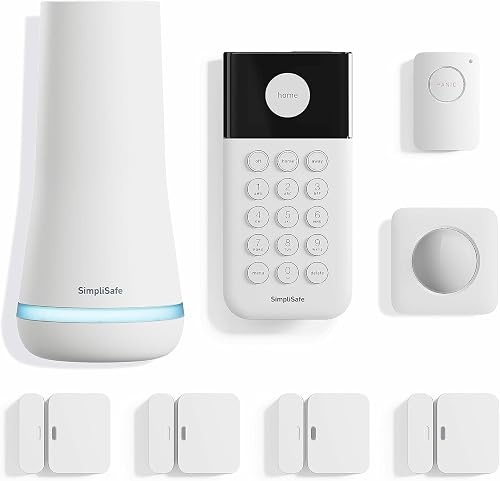
SimpliSafe suits renters who want alerts without drilling holes. The base station plugs in, the keypad needs no wiring and the sensors attach with adhesive.
The 8-piece kit includes four entry sensors, a motion sensor and a panic button.
The panic button is the unusual part. It triggers the alarm and can dispatch police fast with a monitoring plan, and a silent panic option sends for help without sound.
That is a useful alert for a bedroom or home office.
Customization comes through the SimpliSafe app. You can arm and disarm from anywhere and set Secret Alerts that quietly notify you when someone opens a private cabinet or door without sounding the alarm.
That is the closest thing here to a truly custom alert.
Monitoring is optional and sold without a long-term contract. A free month is included.
The 95 dB siren is quieter than the 120 dB kits in this list, so it leans on alerts and monitoring more than noise.
Buy it if you rent and want discreet, custom alerts. Skip it if you want the loudest siren or no subscription at all for remote arming.
X-Sense Smart Home Security System: Best for apartment-sized coverage
- 5 pieces
- X-Sense app alerts
- Alexa compatible
- expandable to 44 devices
A small 5-piece kit for a bedroom, apartment or rental. The X-Sense app handles Home, Away and Disarm modes with schedules, and the system expands to 44 devices.
Pros
- Simple app modes and schedules
- Expands to 44 devices
- Five-year sensor battery life
Cons
- Smallest kit here
- 2.4GHz Wi-Fi only
X-Sense suits an apartment, dorm or rental where one or two entry points matter. The 5-piece kit is one base station, one keypad, two door sensors and a motion sensor.
It is the smallest kit here, and that is the point.
The app is the alert hub. It sets Home, Away and Disarm modes with automatic schedules, so alerts only fire when they should.
A panic button on the keypad triggers the alarm for immediate help.
Expansion to 44 devices means you can start small and grow. Add door and window sensors, motion detectors, keypads, water leak sensors or thermo-hygrometers as your needs change.
Six keypads and 44 extra devices are supported.
Sensor batteries last up to five years, which keeps maintenance low. Alexa routines can tie motion events to other smart devices.
The network is 2.4GHz Wi-Fi only.
Its trade-off is coverage. Two door sensors leave most windows uncovered, so a house needs more pieces from the start.
For a studio or a rental with one main door, though, it is simple and quick to install.
Buy it if you want a small, tidy kit with scheduled alerts. Skip it for a whole house unless you plan to expand.
D1D9 24pcs Wireless DIY Home Burglar Alarm: Best for Wi-Fi backup with 4G
- 24 pieces
- 4G and Wi-Fi
- app alerts
- no monthly fee
A large kit that keeps sending alerts over 4G when your Wi-Fi drops. It needs a SIM card or Wi-Fi, and the 24 pieces cover doors, windows and a motion zone.
Pros
- 4G backup for alerts
- Large 24-piece kit
- No monthly fee
Cons
- Needs a SIM card or Wi-Fi
- Batteries are not guaranteed
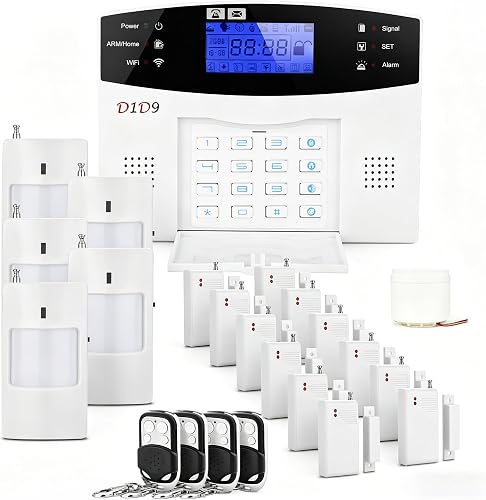
D1D9 suits homes where the Wi-Fi is unreliable or the router sits far away. The 24-piece kit includes a 4G and Wi-Fi hub, a wired siren, a motion detector, two remotes and four door and window sensors.
It sends app alerts without a monthly fee.
The 4G backup is what sets it apart. When Wi-Fi drops, the hub can stay connected over a cellular network, so alerts still reach your phone.
You need a SIM card or Wi-Fi to run it, and the SIM is not in the box.
It is a large kit for the money, but the piece count needs reading carefully. The 24 pieces are the full kit contents, not 24 separate sensors.
The wired siren needs a power outlet near where you mount it.
Against tolviviov, D1D9 trades app polish for connectivity redundancy. Its setup is peel-and-stick, and D1D9 says installation takes about 30 minutes.
One caution: the batteries are included as gifts, and D1D9 asks you to replace them if they arrive dead.
Buy it if Wi-Fi outages are a real risk in your area. Skip it if you want a simple Wi-Fi-only kit with a cleaner app.
YISEELE Home Security System Wireless: Best for voice control with Alexa and Google
- 4 door sensors
- 120 dB siren
- Alexa and Google Home
- no monthly fee
A Wi-Fi kit with four door and window sensors and a 120 dB siren. Voice commands arm and disarm it through Alexa or Google Home, and the hub has a backup battery.
Pros
- Works with Alexa and Google Home
- Backup battery in the hub
- Expands to 100 accessories
Cons
- Four door sensors only
- 2.4GHz Wi-Fi only
YISEELE suits a smart home that already runs on Alexa or Google. The kit has a hub, four door and window sensors and a remote, with a 120 dB siren built into the hub.
Voice commands handle Away Arm, Home Arm and Disarm.
The backup battery in the hub keeps alerts and the siren alive during a blackout for hours. That is a detail many budget kits skip.
The remote also has a one-touch SOS for seniors or children at home.
Custom alerts run through the Smart Life app. You enable push notifications and get real-time alerts whenever a door or window sensor trips.
You can arm remotely and review event records. SMS and phone call alerts are optional and sit behind a payment page in the app, but push alerts stay free.
Expansion reaches up to 100 accessories, so you can add motion detectors, smoke sensors, leak sensors or an outdoor siren later. The 433MHz sensor signal is designed to cut false alarms.
Its trade-off is sensor count. Four door sensors cover a small home; a larger one needs add-ons.
Wi-Fi is 2.4GHz only.
Buy it if you want voice control and a backup battery. Skip it if you need lots of sensors in the box on day one.
TUGARD Alarm System with Phone APP Alert: Best for custom alert calls and texts
- 12 pieces
- TFT color screen
- Wi-Fi and 2G
- app alerts
- calls and texts
A 12-piece kit with a 2.4-inch TFT screen that shows arm status at a glance. It sends push alerts, calls and texts to your phone, and runs on Wi-Fi with 2G backup.
Pros
- Alert calls and texts as well as app pushes
- Color screen shows system status
- 2G backup when Wi-Fi is down
Cons
- 2G needs a separate SIM card
- 2.4GHz Wi-Fi only
TUGARD suits a household that wants alerts by phone call and text, not just a push notification. The 12-piece kit includes a hub with a 2.4-inch TFT color screen, a PIR motion detector, four door and window sensors, two remotes, two RFID cards, a siren and an adapter.
The alert options are the selling point. When a sensor trips, the app pushes a notification and the hub can call or text a preset phone number.
That matters for someone who does not watch app notifications, like an older parent.
It runs on 2.4GHz Wi-Fi with 2G backup. A 2G SIM card is not included, so you buy one separately.
The screen shows time and arm or disarm status, so you can read the system state without opening the app.
RFID cards arm and disarm at the hub. The system supports 100 wireless zones, 10 remotes, 10 RFID cards and 3 wired zones.
It works with Alexa and Google Assistant for voice control.
Its trade-off against the top pick is setup complexity. The SIM and the 2G network add steps.
If you only want app alerts and a siren, the tolviviov kit is simpler.
Buy it if custom call and text alerts are the priority. Skip it if you do not want to manage a SIM card.
Hapippofa GEN 2 Wireless Home Security System: Best for touchscreen control
- 16 pieces
- touchscreen hub
- Wi-Fi and 4G
- 120 dB wired siren
- no monthly fee
A 16-piece kit with a touchscreen hub for Stay, Away, Disarm and SOS modes. It runs on Wi-Fi with 4G backup, and the wired siren hits 120 dB.
Pros
- Touchscreen hub
- Wi-Fi plus 4G backup
- Three motion detectors
Cons
- 4G needs a separate SIM and plan
- 2.4GHz Wi-Fi only
Hapippofa suits a family that wants a visible control panel. The 16-piece kit centers on a touchscreen hub for Stay Arm, Away Arm, Disarm and SOS modes.
Six door and window sensors, three motion detectors, two remotes, two RFID key fobs and a 120 dB wired siren round it out.
The touchscreen is the differentiator. It shows system status and switches modes with a tap, which helps guests or family members who find app menus confusing.
The SOS button calls for help in one press.
Alerts arrive through the Smart Life app over 2.4GHz Wi-Fi. A 4G SIM adds alarm phone calls and SMS, and the SIM and plan are sold separately.
Sensors come pre-paired, so setup is mostly mounting.
Three motion detectors give it more interior coverage than most kits here. That suits a house with hallways, a garage and several rooms.
The 120 dB wired siren needs a power outlet at the mounting spot.
Its trade-off is the SIM requirement for cellular alerts and the price of the larger kit. Without a SIM, it behaves like a standard Wi-Fi system with a touchscreen.
Buy it if a touchscreen and SOS button matter to your household. Skip it if you want the lowest-cost Wi-Fi-only setup.
How the DIY home security kits compare on alerts and coverage
The comparison table lines up what decides the alert experience: connection type, kit size, siren volume and whether the system needs a subscription. Read down the columns to see where each kit lands.
| Product | Best for | Connectivity | Siren | Expansion | Our score |
|---|---|---|---|---|---|
| tolviviov 15-Piece WiFi Home Security System | free app alerts on a budget | 2.4GHz Wi-Fi | 120 dB | Up to 20 sensors | 9.2 |
| Ring Alarm 8-Piece Kit (2nd Gen) | optional professional monitoring | Wi-Fi with range extender | Add-on sensors sold separately | 9.1 | |
| Ring Alarm 14-Piece Kit | larger homes | Wi-Fi with range extender | Add-on sensors sold separately | 9.0 | |
| SimpliSafe 8-Piece Wireless System | renters who want no contract | Wireless | 95 dB | 8.9 | |
| X-Sense Smart Home Security System | apartment-sized coverage | 2.4GHz Wi-Fi | Up to 44 devices | 8.8 | |
| D1D9 24pcs Wireless DIY Home Burglar Alarm | Wi-Fi backup with 4G | 4G and Wi-Fi | Wired siren | 8.7 | |
| YISEELE Home Security System Wireless | voice control with Alexa and Google | 2.4GHz Wi-Fi | 120 dB | Up to 100 accessories | 8.5 |
| TUGARD Alarm System with Phone APP Alert | custom alert calls and texts | 2.4GHz Wi-Fi and 2G | 8.3 | ||
| Hapippofa GEN 2 Wireless Home Security System | touchscreen control | 2.4GHz Wi-Fi and 4G | 120 dB wired | 8.0 |
How these DIY home security systems were compared
Our score weighs specs, features and how well each kit fits what a buyer searching for custom alerts wants. We looked at connection type first, because a kit that loses its link cannot send an alert.
Wi-Fi-only kits score well when the app is solid; kits with cellular backup earn credit for reliability.
Next we checked how alerts are customized. App mode schedules, push versus call and text options, secret alerts and voice control all count.
A kit that only pings on every trigger scores lower than one that lets you decide which events reach you.
Then we weighed kit size against the home it suits. A 5-piece kit is fine for an apartment but thin for a house.
Siren volume, expansion limits and whether a subscription is required for the best features rounded out the score. Prices and review counts played no part.
If you are still deciding what matters most, our roundup of the best DIY home security systems covers the category more broadly. And if you are building out a kit piece by piece, the guide to choosing a DIY home security kit explains hubs, sensors and sirens.
What should you look for in custom alerts?
Start with the alert channel. Every kit here pushes to a phone app.
D1D9 and TUGARD/Hapippofa (with a SIM) also call or text, and that matters if the person receiving alerts does not watch an app.
Then check whether you can customize when alerts fire. Look for schedules or modes that stop notifications during your normal hours.
SimpliSafe's Secret Alerts and the Smart Life app's mode schedules are the clearest examples in this list.
Finally, match the alert path to your network. A Wi-Fi-only kit sends alerts only while Wi-Fi works.
If outages are common or your router is weak, a 4G or 2G backup kit keeps alerts flowing.
Push, call or text alerts
Push alerts are free and instant, but they blend into the notifications you already ignore. Call and text alerts reach you when the phone is in your pocket and you are not looking at an app.
TUGARD sends both, and Hapippofa adds calls and SMS with a 4G SIM. For an older relative living alone, a call alert is easier to act on.
Wi-Fi only versus cellular backup
Wi-Fi-only kits like tolviviov, X-Sense and YISEELE are simple and cheap to run. Their weakness is the network.
A 4G kit such as D1D9 or Hapippofa stays online when the router drops. The cost is a separate SIM and plan.
Pick cellular if you travel and rely on remote alerts; pick Wi-Fi-only if your home network is stable and you want the simplest setup.
Which connectivity fits your home?
Match the kit to your network before anything else. If your router is 5GHz-only, the tolviviov, X-Sense, YISEELE, TUGARD and Hapippofa kits all need the 2.4GHz band enabled first.
Ring and SimpliSafe connect without that step.
A large house also needs a range check. Ring includes a range extender in both its kits.
The Wi-Fi kits here rely on a strong 2.4GHz signal reaching the base station, so keep the hub central rather than in a far corner.
If you are unsure about hubs and sensors in general, our guide to choosing a DIY home security kit covers the basics in more depth.
Alerts that survive an outage
Only the D1D9, TUGARD and Hapippofa kits offer cellular backup. D1D9 and Hapippofa use 4G; TUGARD uses 2G.
Each needs a SIM card and a plan, sold separately. Ring Protect also keeps the system online if Wi-Fi goes down, but only with the subscription.
If your area has frequent storms or outages, the extra connectivity is worth the setup.
Signal range and hub placement
Keep the base station near the center of the home and within reach of your router. A 2.4GHz signal weakens through thick walls and metal, so a hub in a back room can miss sensors.
Ring's included extender helps on long floor plans. On the Wi-Fi kits, mounting the hub in a hallway closet is a common mistake.
How much should you plan to expand?
Count your doors and ground-floor windows first. A 5-piece kit such as X-Sense covers a studio or a one-door apartment.
An 8-piece kit fits a 1-2 bedroom home. A 12 to 15 piece kit covers a house with several entries.
A 24-piece kit leaves room for a garage or shed.
Expansion limits also matter. YISEELE supports up to 100 accessories and X-Sense up to 44 devices. tolviviov supports up to 20 sensors and 5 remotes.
Ring and SimpliSafe sell add-on sensors at any time. Choose a kit with room to grow if you plan to add cameras or leak sensors later.
Sensors for doors and windows
Door and window sensors are the core of custom alerts. Each one tells you when that opening moves. tolviviov includes 10 door sensors, Ring's 14-piece kit includes eight contact sensors and SimpliSafe includes four entry sensors.
Match the count to your accessible openings. A motion sensor covers a hallway or room but does not tell you which door opened.
Motion sensors and pets
Motion sensors add coverage but also false alerts. SimpliSafe's motion sensor works with pets under 60lb and covers 35 feet.
YISEELE's sensor signal is designed to reduce false alarms. tolviviov's motion sensor has no zone tuning, so a pet or curtain can trip it. If you have pets, look for a motion sensor with pet tolerance or skip motion and rely on door sensors.
Do you need professional monitoring?
Not necessarily. Every kit here sends free app alerts without a subscription.
Professional monitoring is an add-on that calls emergency services when an alarm fires. Ring and SimpliSafe offer it.
The other kits here do not include a monitoring plan.
The case for monitoring is travel or a home where nobody reacts to a phone alert. SimpliSafe offers it without a long-term contract, starting at less than 1 dollars/day.
Ring Protect adds 24/7 response plus cellular backup and remote arming. If you are home most of the time and watch your phone, free alerts are enough.
When free alerts are enough
Free app alerts suit renters, small apartments and anyone who checks their phone constantly. tolviviov, X-Sense, YISEELE, D1D9, TUGARD and Hapippofa all run without a monthly fee. Pair one with a 120 dB siren and you have deterrence plus notification.
The gap is what happens when the alarm fires and no one is home to call for help.
When to pay for a plan
Pay for a plan when you travel often, live alone, or want an outside party to act. SimpliSafe's no-contract option and Ring Protect both add 24/7 response.
Ring Protect also keeps the system online during Wi-Fi loss. Factor the monthly cost into your budget before buying the kit, not after.
Which custom alert kit is right for you?
Pick the tolviviov 15-Piece kit if you want free, real-time app alerts and a loud siren without a monthly fee. Choose Ring for optional professional monitoring, and the 14-piece kit if your home has more than two bedrooms.
Renters should look at SimpliSafe for no-drill setup and Secret Alerts, and a small apartment fits X-Sense.
The final decision rests on three things: your network, your home size and whether you want a plan. If Wi-Fi is stable, a Wi-Fi kit sends alerts fine.
If outages are common, pay for a cellular kit. If you travel, add monitoring.
For the full category view, start with the best DIY home security systems and our guide to choosing a DIY home security system. Then match the kit to the doors and windows you actually have.
That is how you get custom alerts you will still act on months after setup.
The best DIY home security systems with custom alerts put the notification first. A kit that pings you for the wrong events, or loses its link when the router drops, is worse than no kit.
Choose for the alerts, then for the sensors.
Our top 3 picks at a glance
-
1
Best for free app alerts on a budget
tolviviov 15-Piece WiFi Home Security System
9.2/10 our score
See it on Amazon -
2
Best for optional professional monitoring
Ring Alarm 8-Piece Kit (2nd Gen)
9.1/10 our score
See it on Amazon -
3
Frequently asked questions
What is a custom alert on a security system?
A custom alert is a phone notification you set up for a specific sensor or condition, such as a door opening while you are away. Apps like Smart Life, Ring and the SimpliSafe app let you choose which events trigger a push, a call or a text.
Can I get security alerts when my Wi-Fi goes down?
Yes, on kits with cellular backup. The D1D9 kit uses 4G, TUGARD uses 2G, and Hapippofa uses 4G, so alerts can still reach you when Wi-Fi drops.
Each needs a separate SIM card and cellular plan.
How many sensors do I need for a small home?
A 5 to 8 piece kit covers most apartments and 1-2 bedroom homes. Count your doors and ground-floor windows first, then add a motion sensor for a hallway.
Larger homes usually need 12 to 15 pieces or more.
Do these systems work with Alexa and Google Home?
Many do. tolviviov, Ring, SimpliSafe, X-Sense, YISEELE, TUGARD and Hapippofa work with Alexa, and several also work with Google Home. Check which voice assistant your home uses before you buy.