SimpliSafe 8-Piece Home Security System Review: Worth It? (October 2026)
The SimpliSafe 8-piece system suits households that want door, window and room protection without a camera. Choose it when its sensor coverage fits your home; choose the camera bundle for indoor video or Ring if you already manage Ring devices.
On this page (8 sections)
- What does the SimpliSafe 8-piece system include?
- Who should buy this bundle, and who should skip it?
- How should you plan installation before attaching sensors?
- What does professional monitoring change?
- When is the camera bundle the better choice?
- How does the Ring Alarm alternative change the decision?
- What daily habits and care keep the system useful?
- Should you choose the SimpliSafe 8-piece system?
The SimpliSafe 8-piece system is a good fit if you want door, window and room protection without an indoor camera. Its appeal is a manageable device set, app and keypad control, and the choice of optional professional monitoring.
Buy it for the coverage you can map onto your home, rather than the number on the box. A household with several separate rooms or a long list of accessible windows may need a different sensor mix.
What does the SimpliSafe 8-piece system include?
The bundle includes four entry sensors, one motion sensor, a keypad, a panic button and a base station. Only five of those devices detect an opening or movement, so “8-piece” does not mean eight protected locations.
SimpliSafe 8-Piece Wireless System: Best for camera-free households
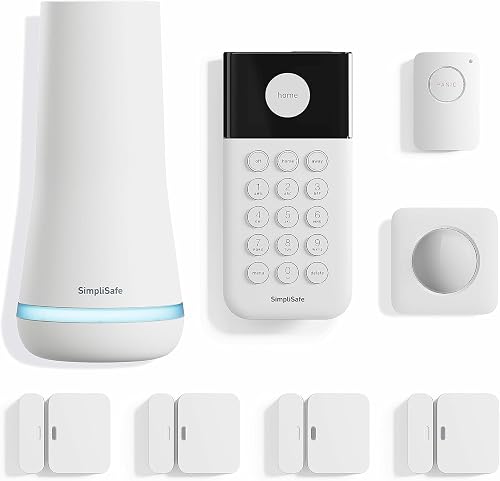
- 4 entry sensors
- 1 motion sensor
- 1 panic button
- Wireless keypad and base station
A useful fit for households that want door, window and room alerts without indoor video. Plan sensor placement first, since the device count includes controls as well as sensors.
Pros
- Entry sensors work on doors, windows or cabinets
- App control and a wireless keypad
- Setup requires no wiring or drilling
- Professional monitoring is optional
Cons
- No camera is included
- One motion sensor limits separate room coverage
- Panic dispatch and network backup require professional monitoring
Entry sensors work on doors, windows and cabinets. Secret Alerts can quietly notify you when someone accesses a private area without sounding an alarm, which gives a cabinet sensor a different purpose from an alarmed exterior door.
The motion sensor covers movement within 35 ft across a 90-degree field of view. SimpliSafe recommends corner placement for room coverage and says the sensor works with pets under 60 lb.
Treat pet suitability as a placement issue as well as a weight limit. Follow the instructions for the room and watch how your pet moves through it before settling on the final position.
The wireless keypad has backlit buttons for arming and disarming without your phone. The SimpliSafe app also supports arming and disarming, while Alexa and Google Assistant support voice arming.
This is a sensor-led system, so it suits people who want to know when an opening is accessed or movement occurs. It does not show who entered, what they carried or what happened afterward.
Who should buy this bundle, and who should skip it?
Buy this bundle if your priority is a few key openings and one useful indoor detection area. It also suits households that want a shared keypad rather than making every routine action depend on a phone.
A compact home with a clear route between entrances may be easier to cover than a larger home with separate wings. Draw the routes someone could take through your rooms, then decide whether the included motion coverage reaches the area that matters.
Skip this bundle if indoor video is central to your plan. Choosing a camera bundle from the start avoids building your decision around a feature this kit does not include.
Also skip it as a complete solution if you expect to monitor every accessible opening in a home with many doors and windows. You can still use it as a starting point, but write down the coverage gaps before committing.
SimpliSafe offers and supports these products and its professional monitoring services only in the US. That makes location an early buying check, especially for anyone ordering equipment for a home abroad.
Match the SimpliSafe 8-piece kit to your floor plan
Start with the openings you most want monitored, then assign the motion sensor to a room or passage that connects them. Bedroom count alone is a poor guide because two homes with the same number of bedrooms can have very different access points.
For example, front and rear doors plus two selected windows use the entire entry-sensor allocation. Assigning one sensor to a private cabinet means choosing another opening to leave without its own sensor.
A room sensor adds a second kind of coverage, but it does not tell you which window opened. Our guide to door and window alarm sensors explains when direct opening detection deserves priority.
How should you plan installation before attaching sensors?
Plan locations, daily access and power before attaching any devices. The setup itself requires plugging in the base station, downloading the app and placing the sensors, with no wiring or drilling required.
Walk through your normal arrival and departure routine first. Choose a keypad location that household members can reach easily, and avoid putting it somewhere that makes everyday arming awkward.
Follow SimpliSafe's instructions for the base station location and sensor alignment. Keep doors and windows usable, and check that curtains, handles or trim will not interfere with the sensor parts.
Clean and dry mounting surfaces according to the installation instructions. Position each sensor temporarily before securing it, then open and close the door or window to check clearance.
For the motion sensor, choose a view of the area you intend to cover. Avoid hiding it behind furniture, and follow the placement guidance around pets and other possible sources of unwanted alerts.
Use clear device names in the app, such as “Rear kitchen door” rather than “Sensor 3.” A useful name makes an alert easier to understand and helps you find the right device during maintenance.
Before relying on the system, confirm that each opening sensor and the motion sensor respond as expected. Learn the proper procedure for checking the panic button before pressing it, especially with professional monitoring active.
SimpliSafe can provide installation help if needed. For a broader planning checklist, our guide to choosing a DIY home alarm system explains how to connect coverage needs with equipment choices.
What does professional monitoring change?
Professional monitoring adds agents who can alert emergency responders, and it enables the panic button's dispatch function and the base station's network backup. Those features should be part of your service decision, rather than assumptions you make after setup.
The package includes one free month of professional monitoring, with no long-term contract. Decide before that month ends whether ongoing monitoring fits how you expect to use the system.
Self-monitoring requires a practical response plan. Think about who will notice an alert while you are asleep, driving or away from your phone, and what that person should do next.
The base station has a backup battery that SimpliSafe says lasts up to 24 hours. Battery backup keeps equipment powered for a limited period; network backup addresses a separate connection problem and requires professional monitoring.
The panic button can trigger an alarm and offers a silent panic option. If emergency dispatch is the reason you want it, make sure the required monitoring service is active and household members understand its use.
No alarm service guarantees a specific arrival time. Review the service terms and keep emergency contact details accurate so your plan matches the response you expect.
Our guide to SimpliSafe monthly costs covers the ongoing-service decision, while how SimpliSafe works without monitoring explains the self-monitoring trade-offs.
When is the camera bundle the better choice?
Choose the SimpliSafe 9-Piece System with HD Camera if viewing indoor activity matters more than having the included panic button. Its specified device set includes a wired SimpliCam and a second motion sensor, with the same number of entry sensors as the smaller bundle.
The camera lets you see activity from your phone and has a built-in stainless steel privacy shutter. Before buying, decide which room you want to view and where the camera can reach power.
Camera placement involves a different decision from motion-sensor placement. You need a useful view while keeping private areas out of frame and routing the power cord where it will not create a snag or trip hazard.
Agree on camera use with other household members. A privacy shutter is useful only when everyone understands when the camera should be open or closed.
The second motion sensor suits a home with two separate areas that need movement detection. It does not increase the number of doors or windows that can have their own entry sensor.
Skip this bundle if you want to avoid indoor cameras or cannot place the camera near suitable power. Do not choose it solely because “9-piece” sounds like a modest step up; the actual device mix is the important difference.
How does the Ring Alarm alternative change the decision?
Choose Ring Alarm if you already use Ring devices and want alarm controls in the same app. Its 8-piece kit includes a base station, keypad, four contact sensors, one motion detector and a range extender.
Ring describes this kit as a fit for 1–2 bedroom homes. Still map the sensors to your openings, since that home-size guidance cannot account for every layout.
The included extender is a useful difference to consider when planning device placement. It does not replace checking communication at each intended sensor location during setup.
Ring provides mobile notifications when the system is triggered. Remote arming, backup connectivity when Wi-Fi goes down and professional monitoring require a compatible Ring Protect plan.
Alexa voice arming and disarming also require a Ring Protect subscription. If voice control or remote control drives your choice, compare the required service features alongside the hardware.
Skip Ring as the answer to an indoor-video need unless you also plan for a camera, because this kit does not include one. For a fuller brand comparison, see Ring Alarm vs SimpliSafe.
If ongoing service is your main concern, our home alarm monthly fees guide lays out the questions to ask before choosing.
What daily habits and care keep the system useful?
Keep the system useful through consistent arming, clear device names and prompt attention to warnings. Equipment cannot cover a door that has been left open or help with an alarm routine nobody follows.
Agree on who arms the system at night and when the last person leaves. Show everyone who needs access how to use the keypad and app, including the steps for handling an accidental alarm.
Check sensor mounting after cleaning, moving furniture or work around doors and windows. Repositioned curtains, loose adhesive or a shifted sensor can change a setup that previously worked as intended.
Keep sensor housings clean using the care instructions, and avoid spraying cleaner directly onto electronics. Treat a repeated warning as a reason to inspect the device and its placement.
Do not confuse the base station's outage backup with the replacement schedule for individual sensor batteries. Follow device-specific guidance and battery warnings; our SimpliSafe battery replacement guide helps with that maintenance task.
If you move, plan the system again for the new floor plan. The sensor arrangement that suited one home may leave important openings or routes uncovered in the next.
Should you choose the SimpliSafe 8-piece system?
Choose the SimpliSafe 8-piece system if its sensor mix covers your priorities and you prefer a camera-free setup. Before ordering, write down the opening assigned to each entry sensor, the room for motion coverage and who will respond to alerts.
Pick the camera bundle when indoor viewing and a second motion area solve a clear need. Pick Ring when managing existing Ring devices in one app matters and its plan requirements fit your routine.
If your coverage map still has major gaps, resolve those before choosing any of these bundles. For the wider brand range, browse our SimpliSafe system guide.
Frequently asked questions
What comes in the SimpliSafe 8-piece system?
The SimpliSafe 8-piece system includes a base station, keypad, four entry sensors, one motion sensor and a panic button; that means five devices detect entry or movement, while the remaining devices control the system or trigger an alarm. No camera is included, so this bundle does not provide indoor video.
Does the SimpliSafe 8-piece system require professional monitoring?
Professional monitoring is optional, but panic-button emergency dispatch and the base station's network backup require a professional monitoring plan; decide who will handle alerts before choosing your service. Our guide to SimpliSafe without monitoring explains the choice for households planning to manage their own security.
Can you install the SimpliSafe 8-piece system yourself?
Yes, setup involves plugging in the base station, downloading the SimpliSafe app and placing the sensors, without wiring or drilling. Plan the locations before attaching devices, then confirm that each sensor responds as expected; the wireless keypad can sit where household members can reach it when entering or leaving.
Is the SimpliSafe 8-piece system enough for a home?
It can be enough when four entry sensors and one motion sensor cover your chosen doors, windows and indoor route; count the openings you want protected rather than judging by bedroom count alone. A divided floor plan, several accessible windows or a need for video may call for a different bundle.